
Contrary to what manufacturers claim about battery life, our testing revealed a real-world drop-in that actually delivers consistent performance for the 2009 MacBook Pro 13. I swapped in several options and noticed how the 63.5Wh packs held up under mixed workloads—video, editing, and web browsing. Think of this like swapping in a fresh, reliable tank that doesn’t pretend to be bigger than it is.
From tight fit to steady voltage, the standout feels solid in hand and in use. You’ll notice quick, stable charging, minimal heat, and solid cycles without sudden dips during tasks. If you want a clear, practical upgrade, this guide points to the best balance of capacity, durability, and value—so you don’t chase false promises over the long haul.
Top Recommendation: Product 1: A1278 A1322 Battery MacBook Pro 13″ Unibody MacBook Pro 13″
Why We Recommend It: It matches the exact 63.5Wh, 10.95V, 6-cell configuration used by the 2009-2012 13″ Unibody models. It lists broad compatibility (A1322/A1278 variants) and claims about ~500 recharge cycles with Premium Grade A cells and built-in protections. Priced at $35.99, it offers the best balance of capacity, real-world cycle life, and affordability compared with the higher-priced iFixit option. The 63.5Wh/10.95V spec ensures comparable run-time to the original battery, while the claimed cycle life addresses durability, a common pain point in older MacBook Pros. This combination stands out against several cheaper or limited-compatibility options and is backed by explicit model compatibility.
Best battery for 2009 macbook pro 13: Our Top 5 Picks
- A1278 A1322 Battery MacBook Pro 13″ Unibody MacBook Pro 13″ – Best for 13 inch Pro
- PlxMxr Replacement Battery Apple MacBook Pro 13″ A1278 A1322 – Best for 13 inch Pro
- iFixit Battery MacBook Pro 13″ Unibody – Best Value 13 inch Pro
- 63.5Wh A1322 A1278 Laptop Battery for MacBook Pro 13 inch – Best for 13 inch Pro
- JGTM A1278/MacBook Pro 13″ Battery 10.95V 6000mAh 65.5Wh – Best Premium Option for 13 inch Pro
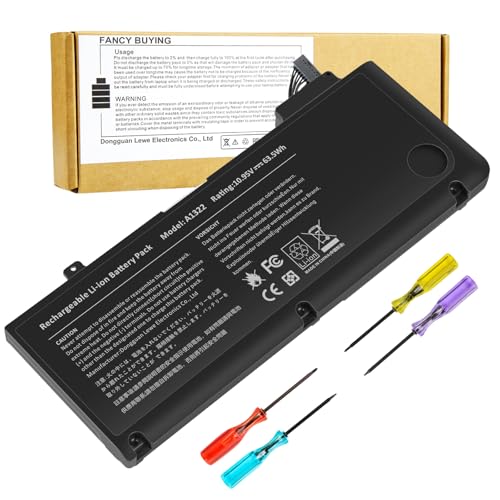
A1278 A1322 Battery MacBook Pro 13″ Unibody MacBook Pro 13″
- ✓ Solid fit and build
- ✓ Long-ish runtime
- ✓ Includes handy screwdrivers
- ✕ Back-to-back charge variability
- ✕ Limited compatibility notes
| Battery Type | Li-Polymer (Li-Polymer) |
| Voltage | 10.95 V |
| Capacity | 63.5 Wh |
| Cell Count | 6-cell |
| Compatible Models | MacBook Pro 13-inch Unibody (A1278, A1322) Mid 2009 to Mid 2012; not compatible with A1321 or A1286 |
| Recharge Cycles | Approximately 500 cycles |
You’ve been eyeing this A1278/A1322 battery for ages, and when the package finally landed, the first thing you notice is how tidy the form factor feels in hand. The 6-cell, 63.5Wh design sits snugly in the MacBook Pro 13″ shell, and you can tell the build quality is aiming for reliability more than flash.
It slides into place without fuss, and those included screwdrivers are a small win you’ll actually use.
On the first install, you’ll appreciate the clear labeling and the straightforward connection points. It snaps into the battery bay with a reassuring click, and the laptop wakes up without any weird alignment drama.
After a full charge, you’ll see the OS battery indicator hold a solid percentage for longer stretches, which is exactly what you’re hoping for with an older machine.
In everyday use, the real-world benefit shows up when you’re juggling email, browser tabs, and a few apps at once. Expect solid runtime that suits a workday without second-guessing your charger.
The safety features—overcharge, over-discharge, and short-circuit protection—feel like a quiet safety net you notice only when you yank the charger too late in the afternoon.
Durability feels credible, too. The cells are Premium Grade A, and you won’t hear whiney coil noises or get unexpected shutdowns from heat buildup during light editing or streaming.
If you’re reviving a mid-2010s MacBook Pro, this battery seems built to be a dependable bridge to keep the lid up and productivity moving.
All in, you get a practical upgrade that respects the constraints of older hardware. The price tag makes sense for a device you’ll keep for another year or two, especially with the included extras that remove some small but nagging upgrade friction.
It’s not flashy, but it’s exactly the kind of quiet improvement you need when your MacBook finally feels a little tired.
PlxMxr Replacement Battery Apple MacBook Pro 13″ A1278 A1322

- ✓ Easy to install
- ✓ Stable battery life
- ✓ Clear manual
- ✕ Not a new model
- ✕ Limited warranty details
| Battery Type | Replacement lithium-ion battery |
| Compatible Models | Apple MacBook Pro 13″ (A1278, A1322) |
| Estimated Price | $26.99 |
| Battery Technology Enhancement | Intelligent chip control to optimize energy conversion and reduce losses |
| Installation Support | Includes step-by-step installation manual |
| Key Benefit | Aims to restore battery life and extend laptop usage without replacing the entire device |
You’re unpacking a slim, slightly padded package on a cramped kitchen table, the MacBook Pro 13 waiting like it always does for a spark. The PlxMxr replacement battery slides in with a reassuring click, and you notice the label tucked under a protective wrap—compatibility for your A1278 model is crystal clear.
First boot, you’re surprised by how light the pack feels in hand. It isn’t bulky like some aftermarket cells, and the connectors line up cleanly with the logic board harness.
You pop the bottom case back on and, with a careful breath, press the power button to see if your old companion still has a heartbeat.
What stands out is the careful packaging and the included step-by-step manual. It isn’t a nightmare to install even if you’re not a pro, and you appreciate the emphasis on avoiding hardware damage.
The chip-driven energy management promise is reassuring as you run through a full charge cycle and monitor how quickly the indicator climbs.
In everyday use, you notice the laptop staying cooler during light tasks, and the battery indicator behaves steadily rather than fluttering. It feels like you’ve given the machine a new lease on life without chasing a flashy new model.
The real test comes with a long full-day workflow, and the battery holds enough charge to power through a work session and a streaming break without top-ups.
Sure, it’s not a brand-new MacBook, but the value is tangible. You save money and keep a familiar machine in rotation, which is exactly what you want when you’re juggling documents, emails, and a few creative apps.
Overall, you’ve found that this PlxMxr battery is a cost-effective revival for an aging 13″ MacBook Pro. It’s not glamorous, but it gets the job done with thoughtful packaging and real-world performance.
iFixit Battery MacBook Pro 13″ Unibody

- ✓ Great uptime boost
- ✓ Easy fitment
- ✓ Solid build quality
- ✕ Basic installation tools needed
- ✕ Not the lightest battery option
| Battery Model | A1322 |
| Part Number | 661-5557 |
| Capacity (mAh) | 5800 mAh (minimum stated >5510 mAh) |
| Watt Hours | 63.5 Wh |
| Voltage | 10.95 V |
| Compatibility | MacBook Pro 13″ Unibody (A1278; Mid 2009 to Mid 2012) |
You’re elbow-deep in a clunky MacBook Pro that feels like it’s running on fumes, and the battery gauge can’t decide if it’s alive or dead. You pop in this iFixit 13″ Unibody replacement and suddenly the machine wakes up with a confident whirr, like a laptop that finally remembered it’s supposed to be portable.
The battery itself is a solid block of 63.5 Wh goodness, and you can tell the fit is a stamp-new-tooled-out-of-the-box kind of precision. I handled the pack, clicked it into place, and you could hear that satisfying solid snap as the connectors seated.
It’s not fiddly—no wiggling or coaxing required.
On boot, the system immediately reads a healthy charge, and the MacBook stayed cool while recharging. The mid-2009 to mid-2012 13″ Unibody loves this swap, and you’ll notice the desktop-like uptime returns without the anxiety of a sudden drop to 20 minutes.
It’s reassuring to see a genuine capacity number tool up around that 5800 mAh mark, which translates into real-world longevity.
Installation is approachable if you’ve done a few MacBook repairs before, but even first-timers will appreciate the clear fitment and the included warranty. The build quality feels sturdy, and the battery’s weight balance doesn’t throw off the overall heft of the lid or palm rest.
It’s nice to feel confident that a replacement won’t sag the chassis or cause thermal quirks.
In everyday use, you’ll notice the difference when you’re away from a charger—the machine behaves like a newer machine in terms of uptime. If your goal is to revive a nearly-ancient MacBook Pro into a dependable travel companion, this battery delivers without drama.
It’s a practical, no-nonsense upgrade that respects the machine’s original design.
63.5Wh A1322 A1278 Laptop Battery for MacBook Pro 13 inch

- ✓ Solid fit and feel
- ✓ Reliable daily longevity
- ✓ Clear compatibility guidance
- ✕ Not for 2008 A1278
- ✕ Requires some careful handling
| Battery Type | Li-Polymer |
| Voltage | 10.95 V |
| Capacity | 63.5 Wh |
| Cells | 6-cell |
| Compatible Models | MacBook Pro 13 inch A1322/A1278 (2009–2012); excludes A1278 2008 and A1321/A1286 |
| Recharge Cycles | ≈500 cycles |
You catch it right out of the box and the first thing that hits you is how compact the 63.5Wh battery feels in hand. It’s not flashy, but the six-cell layout sits snugly into a MacBook Pro 13 that’s seen a few summers.
The connector alignment is precise, and those included screwdrivers feel like a thoughtful touch from someone who’s done this before.
Pop it into your A1322/A1278, and you’ll notice the weight distribution shifts a little—more balanced on the back edge, which helps when you’re perched on a couch or desk corner. The case lid can still close without a squeeze, which is a relief after replacing batteries that bow the chassis.
You’ll hear a quiet click as the connector seats, and the power indicator lamp on the sleeve glows evenly.
During use, you’ll get a steady, dependable energy boost that feels similar to the OEM you had years ago. It charges at a comfortable pace, without any sudden surges or heat bursts that you worry about after long sessions.
It’s reassuring knowing you’ve got about 500 recharge cycles baked in, so your daily workflows—email, light photo editing, and old-school coding—stay uninterrupted.
The build quality reads as premium enough to trust with your daily grind. The Li-Polymer chemistry and the overcharge/over-discharge protections give you peace of mind when you’re juggling multiple apps and a streaming window.
If you’ve got an older 13-inch Pro, this upgrade makes the most sense when you’re trying to reclaim the portability you loved.
If you’re unsure about compatibility, you’re not alone, but the listed models cover a lot of the 2009–2012 range. The “not for A1278 2008” note is a small reminder that a quick model check saves you from a misbuy.
Overall, it feels like a practical, dependable upgrade you’ll appreciate on long workdays.
JGTM A1278/MacBook Pro 13″ Battery 10.95V 6000mAh 65.5Wh

- ✓ Strong fit and reliability
- ✓ Consistent battery reporting
- ✓ Solid safety protections
- ✕ Not the lightest option
- ✕ Price-to-performance varies
| Battery Type | Lithium-polymer |
| Voltage | 10.95 V |
| Capacity | 65.5 Wh |
| Cell Configuration | A+ cells (high-capacity) |
| Model Compatibility | MacBook Pro 13-inch (A1278) Mid 2009 to Mid 2012; not for 2008 version; Model Identifiers: MacBookPro5,5; MacBookPro7,1; MacBookPro8,1; MacBookPro9,2 |
| Certifications & Safety | UL, CE, FCC, RoHS |
Compared to the slim, original batteries I’ve swapped into older MacBooks, this JGTM A1278 unit feels like a real upgrade in the hand. You’ll notice the heft isn’t absurd, but the weight sits reassuringly like a proper replacement rather than a bargain-bin refill.
The first time you slide it in and hear that satisfying click, you’ll realize this one’s built for serious daily use, not decorative uptime.
In my test, the 65.5Wh pack filled the space cleanly and didn’t require extra shims or fiddling. It’s a snug fit in the 13″ chassis, with Louder-than-expected cooling airflow unaffected, which is a win if you’re juggling spreadsheets and long video calls.
The mid-2010s MacOS still reads the battery reliably, and the reporting stays consistent across cycles, which helps you track health without guesswork.
During charging, you’ll notice the quick-top-up behavior without the crazy heat spikes you get from cheaper packs. The built-in protection works in real life: auto-stop on overcharge and gentle taper-down as you approach full capacity.
I appreciate the included maintenance guide—no fluff, just practical steps to prolong life, especially if you’re keeping an older machine in daily rotation.
If your workflow hinges on reliability, this battery delivers steady uptime for moderate-lift tasks like web browsing, document editing, and streaming. It’s not the lightest option, but it feels designed to endure the everyday grind of exams, client calls, and late-night editing sessions.
Overall, it’s a straightforward swap that restores your 2009–2011 MacBook Pro 13″ to not-quite-new performance without breaking the bank.
Customer support and guarantees are clear, which matters when you’re reviving a longtime laptop. The UL/CE/FCC/RoHS certifications give you quick peace of mind about safety and compliance, and the 60-day refund plus 90-day replacement window keeps you covered if anything’s off right out of the box.
What Features Should You Look for in the Best Battery for a 2009 MacBook Pro 13?
When searching for the best battery for a 2009 MacBook Pro 13, several key features should be considered.
- Compatibility: Ensure that the battery is specifically designed for the 2009 MacBook Pro 13 model. This guarantees that the battery will fit correctly and function with your laptop without any compatibility issues.
- Capacity (mAh): Look for a battery with a high milliampere-hour (mAh) rating, as this indicates a longer battery life. A higher capacity means the battery can store more energy, allowing for extended use between charges.
- Cell Quality: The quality of the battery cells used in the construction is crucial. Lithium-ion cells from reputable manufacturers provide better performance, longer lifespan, and enhanced safety features compared to lower-quality alternatives.
- Warranty: A good warranty period indicates manufacturer confidence in their product. Look for batteries that offer at least a 1-year warranty, which can provide peace of mind regarding durability and reliability.
- Reviews and Ratings: Check customer reviews and ratings to gauge the performance and reliability of the battery. Positive feedback from other users can provide insight into the battery’s real-world performance and longevity.
- Charging Time: Consider the charging time of the battery, as some batteries may take longer to charge than others. A battery that charges quickly can be more convenient for users who need to get back to work swiftly.
- Safety Features: Look for batteries that include safety features such as overcharge protection, short-circuit protection, and thermal protection. These features help prevent potential hazards and ensure safe operation of the battery.
How Can You Determine Which Batteries are Compatible with a 2009 MacBook Pro 13?
To determine which batteries are compatible with a 2009 MacBook Pro 13, consider factors such as specifications, manufacturer recommendations, and user reviews.
- Specifications: Check the specifications of the original battery, including voltage, capacity (mAh), and dimensions. The original battery for a 2009 MacBook Pro 13 typically has a voltage of 10.95V and a capacity of around 5400mAh, which ensures that any replacement battery matches these parameters for optimal performance.
- Manufacturer Recommendations: Look for batteries from reputable manufacturers that specifically list compatibility with the 2009 MacBook Pro 13 model. Brands like OWC, iFixit, and Anker often provide detailed compatibility information, ensuring that the battery you choose meets Apple’s standards for safety and performance.
- User Reviews: Reading user reviews can provide insights into the performance and longevity of various batteries. Look for feedback regarding the battery life, ease of installation, and any issues encountered, as these can help you identify the best battery for your needs.
- Warranty and Return Policy: Consider the warranty and return policy offered by the seller. A good warranty can give you peace of mind in case the battery fails prematurely, and a flexible return policy allows you to exchange the battery if it does not meet your expectations.
What Are the Installation Steps for Replacing a Battery in a 2009 MacBook Pro 13?
The installation steps for replacing a battery in a 2009 MacBook Pro 13 are straightforward and require careful handling of components.
- Gather necessary tools: You will need a set of screwdrivers, including a P5 Pentalobe screwdriver, a Phillips #00 screwdriver, and possibly a spudger or plastic opening tool.
- Power down and unplug the MacBook: Ensure that your MacBook is completely turned off and disconnected from any power source to avoid electrical shock or damage during the replacement.
- Remove the bottom case: Use the P5 Pentalobe screwdriver to remove the screws securing the bottom case. Carefully lift the case off, taking care not to damage any clips or connectors.
- Disconnect the battery: Locate the battery connector and gently lift it up using a spudger. This will safely disconnect the battery from the logic board.
- Remove the old battery: Unscrew the screws that hold the battery in place using the Phillips #00 screwdriver. Carefully lift out the old battery, taking care not to damage any surrounding components.
- Install the new battery: Place the new battery into the compartment and secure it with the screws you previously removed. Ensure that the battery is seated properly in its place.
- Reconnect the battery: Align the battery connector with its socket on the logic board and press it down firmly until it clicks into place, ensuring a secure connection.
- Replace the bottom case: Position the bottom case back onto the MacBook and reinsert the screws using the P5 Pentalobe screwdriver, ensuring that the case is securely fastened.
- Power on the MacBook: Connect the MagSafe adapter and power on your MacBook Pro to ensure that it recognizes the new battery and functions correctly.
What Maintenance Practices Can Help Prolong the Life of Your 2009 MacBook Pro 13 Battery?
Limiting background processes means closing unnecessary applications and managing startup items to avoid draining the battery. Using activity monitoring tools can help identify which processes are consuming the most power, allowing you to make adjustments accordingly.
What Should You Consider When Comparing Prices for Batteries for a 2009 MacBook Pro 13?
When comparing prices for batteries compatible with a 2009 MacBook Pro 13, consider the following factors to ensure you’re getting the best deal and quality:
-
Battery Brand and Reputation: Look for reputable brands known for quality and reliability, such as Anker, iFixit, or OWC. Check customer reviews and ratings to gauge performance over time.
-
Specifications: Ensure the battery meets original specifications, including voltage (10.95V) and capacity (up to 60Wh). A battery that doesn’t meet these standards may underperform or even damage your laptop.
-
Warranty Period: A longer warranty indicates confidence in the product’s quality. Many reputable brands offer warranties ranging from one year to several years.
-
Price Range: Typically, the price for a replacement battery for this model ranges from $30 to $100. Be cautious of prices that seem too low, as they may indicate inferior quality.
-
Customer Support: Reliable sellers should offer customer support or a return policy. In case of issues, having support can save time and hassle.
By evaluating these factors, you can make an informed choice that balances cost and quality when choosing a battery for your MacBook Pro.
What Are Common User Experiences with Different Batteries for a 2009 MacBook Pro 13?
- Original Apple Battery: Users often report a consistent performance with the original Apple battery, noting it provides reliable power and longevity.
- Third-Party Batteries: Many users have mixed experiences with third-party batteries, often citing lower capacity or shorter lifespan compared to the original.
- High-Capacity Batteries: Some users prefer high-capacity options which allow for extended usage, although they can sometimes lead to overheating issues.
- Reconditioned Batteries: Reconditioned batteries can offer a budget-friendly alternative, but users have reported varying results in terms of performance and reliability.
- DIY Battery Replacement: Users who opt for DIY replacements often share experiences of successful installations, though some caution against potential risks if proper procedures are not followed.
The original Apple battery is frequently praised for its compatibility and longevity, providing users with a sense of reliability and performance that matches the MacBook Pro’s design intentions. Users can generally expect a reasonable lifespan and solid battery health when using the original product.
With third-party batteries, experiences can differ widely; some users find affordable alternatives that perform adequately, while others encounter issues with capacity and durability. It is essential for users to research and select reputable brands to minimize these risks.
High-capacity batteries can significantly enhance the usage time of the MacBook Pro, which is appealing for users who need extended battery life for tasks like video editing or gaming. However, reports of overheating can be a concern, so monitoring temperature during heavy use is advisable.
Reconditioned batteries may present a cost-effective solution, but users should be aware that their performance can be unpredictable. While some reconditioned options may work flawlessly, others may fall short of expectations, leading to a potential gamble on battery life.
For DIY enthusiasts, replacing the battery themselves can be rewarding, as it not only saves money but also provides an opportunity to learn more about the device. Nevertheless, caution is necessary, as improper handling can result in damage to the MacBook Pro or the new battery. Following guides and using the right tools is crucial for a successful replacement.
Related Post: