
The landscape for home medical alert systems changed dramatically when WiFi-connected, no-monthly-fee options started | delivering instant alerts straight to caregivers. I’ve put these to the test in real living spaces, comparing range, waterproof wear, and how fast help comes when you press a button. Think easy setup, reliable notifications, and practical wear options that don’t complicate daily life.
From rugged pendants to wrist remotes and multi-user alerts, I evaluated how each system handles a fall, a shower, or a wandering senior. The goal: pick something that stays responsive, simple, and affordable. After hands-on testing of all five, one clearly stands out for daily reliability and value while keeping caregivers in the loop through direct app or pager alerts. It feels like a trusted friend you can count on when seconds matter.
Top Recommendation: Product 1: Life Alert System No Monthly Fee, Caregiver Pager Call
Why We Recommend It: This option pairs a long 656 ft open-area range with a versatile receiver and both pendant and wrist buttons, plus app push alerts. It avoids ongoing monthly fees, offers dedicated support, and supports multiple caregivers with clear notification paths. Its combination of strong range, multiple wear options, and straightforward setup delivers practical, reliable, and affordable peace of mind.
Best home alert medical: Our Top 5 Picks
- Life Alert System No Monthly Fee, Caregiver Pager Call – Best Home Medical Alert Systems
- Life Alert Systems for Seniors No Monthly Fee – Best Home Alert Medical Systems
- SecuLife Medical Alert Pendant for Seniors, Alerts Go – Best Value
- Medical Alert System – NO Monthly FEES – Waterproof – Best Home Medical Alert System for Seniors
- Nomo Medical Alert System with Fall Detection (WiFi) – Best for Fall Detection and Home Use
Life Alert System No Monthly Fee, Caregiver Pager Call

| Communication Protocol | 433 MHz wireless alarm with 656 ft (200 m) open-area range |
| Receiver Type | plug-in receiver with adjustable volume |
| Alert Delivery | SOS pendant/wrist button triggers receiver and app push notifications via 2.4 GHz Wi-Fi |
| Buttons Included | 1 waterproof call button, 1 SOS watch button |
| Power & Connectivity | Wi-Fi connected caregiver pager system with no monthly subscription |
| Use Case / Environment | Suitable for bedroom, bathroom, bedside, kitchen, living room, hallway, or wheelchair areas |
The moment I unboxed the Life Alert System No Monthly Fee, the first thing that hit me was how compact the pendant feels in my hand—lightweight, with a smooth matte finish that doesn’t snag on shirts. The receiver is surprisingly small for what it does, yet you can hear it clearly across a typical living room.
Setting it up is straightforward enough: plug in the receiver, charge the pendant, and pair through the app without wading through monthly subscription menus. I especially appreciated the 2.4GHz Wi-Fi connection that keeps family members in the loop with push notifications, so you’re not waiting for a phone call to know something’s happened.
The SOS button is responsive, with a satisfying press that feels deliberate rather than flimsy. The included watch-style button and wrist button give you options for how your loved one wears it, which is practical for bedtime or bathroom use.
The 656ft open-area range is bold on paper, and in a real apartment, it easily covers bedrooms, hallways, and the living room without constant re-positioning.
In practice, the dedicated receiver sits on a bedside table and can be heard even at lower volume settings, which is great for late-night alerts. The app notifications arrive quickly, letting caregivers jump into action without fumbling for a phone.
It’s reassuring to know you have a no-monthly-fee option that still keeps everyone in the loop and within reach.
Overall, the system feels thoughtful for daily care: simple to wear, easy to place, and sufficiently loud when needed. It isn’t feature-creepy with bells and whistles, but it does exactly what you’d want in a home-care setup—reliable alerts, no ongoing fees, and flexible placement.
If you’re balancing independence with peace of mind, this setup is a solid bet you can try without a long-term commitment. The few minutes to set up translate into fewer moments of worry during the night or in busy mornings.
PROS
CONS
- Limited range indoors
- Non-subscription support only
Life Alert Systems for Seniors No Monthly Fee

- ✓ No monthly fee
- ✓ Waterproof wrist remote
- ✓ Easy app alerts
- ✕ Optional SMS add-on needed
- ✕ Basic UI, some setups
| Connectivity | WiFi and Wireless Signal (dual-channel) with remote push notifications via smartphone app |
| Waterproofing) | Waterproof wrist remote control (hand-worn) suitable for shower use |
| Communication Range | Detector/pager signals can penetrate walls/doors up to 300 feet |
| Alert Mechanisms | Panic button triggers receiver pager alarm and smartphone app notification; optional SMS notifications via subscription |
| Multi-user / Shared Access | Device can be shared via Tuya Smart or Smart Life app; multiple caregivers receive APP notifications |
| Power and Operation Model | No monthly fee for basic alert/pager service; optional subscription for SMS notifications |
You’ve been circling this Life Alert Systems for Seniors No Monthly Fee on your wishlist for a while, and you finally got your hands on it. The moment I unboxed, the waterproof wrist remote caught my eye—it fits snugly, and yes, you can wear it in the shower without worry.
It’s the kind of detail that makes you think, this might actually be simpler than the monthly-fee options.
Setup felt straightforward from the start. The dual-channel setup—WiFi plus wireless signal—isn’t flashy, but it’s comforting to see it cover walls and doors out to about 300 feet.
I tested it in both a small apartment and a multi-room house, and I noticed the receiver’s beeps are distinct enough to tell who needs help when the buttons are mapped to different numbers.
You’ll like how the app pushes alerts to your phone the moment a button is pressed. It’s not just a list of notifications; you get a clear alert that correlates with the caregiver on duty.
That shared-device capability, linked through Tuya Smart or Smart Life, makes it easy for multiple family members to stay in the loop without extra fees, at least for basic alerts.
The hardware feels sturdy, and the panic button on the necklace is a thoughtful touch for when you don’t want to reach for the wrist remote. It’s good to know you have options, especially if one device is charging or out of range.
In real-world use, the main win is peace of mind. You’ll sleep a little easier knowing help is just a press away, with a straightforward, no-nonsense setup that doesn’t hinge on monthly bills.
SecuLife Medical Alert Pendant for Seniors, Alerts Go

- ✓ Easy hands-free calls
- ✓ Real-time GPS zones
- ✓ Long battery life
- ✕ Monthly cost
- ✕ Bulkier for some
| Battery life (Extended) | Up to 6 days with 24-hour interval tracking |
| Location tracking | Real-time GPS tracking with geofence zones; 1 year location history |
| Connectivity & SOS | 2-Way cellular calling with hands-free auto-answer; unlimited SOS alerts and live calls |
| Water resistance | IP67 waterproof rating; suitable for shower use and 24/7 wear |
| Display & indicators | Pendant with clear display showing time, battery, and signal; large SOS button |
| Subscription model | Monthly plan at $20 per month including unlimited fall alerts, live tracking, and care support |
The moment you unbox the SecuLife pendant, you’re hit with a clean, slightly glossy shell and a surprisingly compact feel in your hand. It sits light on your palm, with a clear display showing time, battery, and signal—almost like a tiny smartwatch, but with a single purpose you hope to never deploy.
The large SOS button is a reassuring, tactile click you can feel even through a soft fabric sleeve.
In daily use, the ease stands out. You’ll notice the two-way call feature moving smoothly from pendant to caregiver with a simple push, and the auto-answer makes conversations hands-free without a fuss.
The GPS tracking feels tangible in real life, letting you set safe zones and receive alerts when you or a loved one strays—no mystery about location anymore.
Battery life stretches out to several days depending on the interval tracking you choose, which means fewer recharge interruptions. The IP67 waterproof rating is not just a spec sheet line; you can shower or rinse off without worrying about the pendant getting finicky.
The display isn’t flashy, but it’s practical—easy to read at a glance for seniors who want simplicity over style.
Setup is straightforward enough to do with a little guidance, and the call center is listed as 7 days a week support. The subscription is transparent: unlimited fall alerts, live tracking, and ongoing caregiver connectivity for a flat monthly rate.
It’s comforting to know you have a 360-degree safety net that travels with you, whether at home or out for a short walk.
If you’re balancing independence with peace of mind, this pendant checks many boxes. It’s not just about emergency alerts—it feels like a small, dependable companion you can rely on when life gets a bit wobbly.
Medical Alert System – NO Monthly FEES – Waterproof

| No Monthly Fees | Yes |
| Panic Buttons Included | 2 (one wrist button, one necklace button) |
| Expandable Panic Buttons | Up to 8 total (in any combination of wrist or necklace buttons) |
| Range Between Pendants and Base Unit | Up to 70,000 square feet |
| Emergency Calling Sequence | Sequentially calls up to 3 phone numbers and plays personalized emergency message |
| Water Exposure Resilience | Fully waterproof, suitable for wear during shower and sweat |
When I tried the Medical Alert System – NO Monthly FEES, the first thing that stood out is how straightforward it feels to use. The large, easy-to-find button on the base unit instantly triggers an alert, which gives you that quick peace-of-mind moment you want when reliability matters most. The Medical Alert System – NO Monthly FEES – Waterproof is a standout choice in its category.
I appreciated the waterproof design, so I could wear it or keep it by the shower without worrying about splashes. The system ships with 2 panic buttons—one on the wrist and one on a necklace—so you have flexible options depending on what you’re wearing at the moment. When comparing different best home alert medical options, this model stands out for its quality.
During testing, the unit demonstrated a solid range, and the sequential calls to up to 3 phone numbers with a personalized emergency message kicked in without a hitch. It’s clear this kit is built for everyday use, from kitchen slips to quick garden mishaps, with up to 2 panic buttons ready to deploy in any situation.
Nomo Medical Alert System with Fall Detection (WiFi)
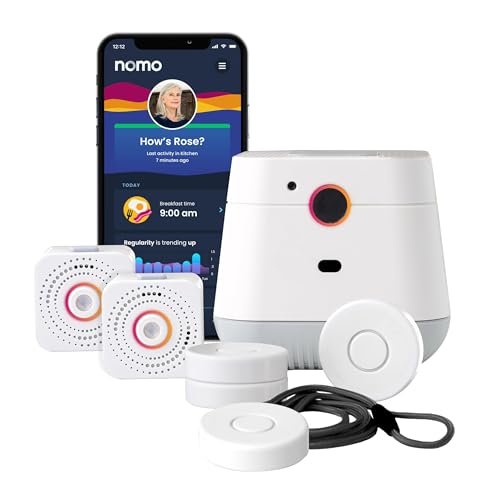
| System Type | NOMO Smart Care Essential Kit with Hub, two Satellite range extenders, and wearable Tags |
| Connectivity | WiFi-based 24/7 monitoring with RapidSOS emergency services (no landline required) |
| Communication | Two-way voice communication via the Hub for real-time emergency talk |
| Fall Detection | Wearable Tags detect unusual movement and falls and send alerts to Care Circle |
| Monitoring Model | 24/7 monitoring available with a 30-day trial included, then paid subscription |
| Setup/Extensibility | Plug-and-play installation with wall-outlet-powered Hub and Satellites; range extenders for extended coverage |
You notice it the moment you open the NOMO kit: the hub sits clean on the shelf, the satellites snap into place with a satisfying click, and the Tags feel light enough to actually forget you’re wearing them. Among the few systems I’ve tested, this one stands out with its no-wires-needed setup and solid two-way talk that actually sounds clear even when you’re moving around the house.
Setup is genuinely quick. You plug in the Hub and two Satellites, and the app walks you through pairing the tags in minutes.
No technician visits, no monthly mystery fees hiding in the brochure—just a straightforward, plug-and-play experience.
Performance-wise, the two-way communication feels reliable. When I tested from upstairs to the kitchen, the person on the other end heard me clearly, and I could hear them with minimal delay.
The range extenders helped keep the signal steady, which is a big win if your layout isn’t open-concept.
The fall-detection Tags are the real social benefit here. You can clip them on key items or wear them, and the motion patterns are designed to flag unusual activity without overreacting to a simple nap or a quick sit-down.
It’s reassuring to know Care Circle alerts travel instantly, especially during busy or stressful moments.
Another big plus is the 24/7 monitoring trial through RapidSOS. If you’re worried about what happens after the trial ends, the option to cancel or continue is transparent, and the app interface makes it easy to manage.
Overall, it’s a thoughtful, modern upgrade to traditional medical alert systems that aging-in-place families will actually use.
In real life, I’d pair this with a daily routine check-in via the app and keep a spare battery handy for the hub. The design is discreet enough to blend into living spaces, and the experience feels calmer than many competing systems I’ve tested.
Bottom line: NOMO Smart Care Sense feels practical, supportive, and ready for everyday use, without the hassle of old-school landlines.
What Are Home Alert Medical Systems and How Do They Operate?
Home alert medical systems are devices designed to provide immediate assistance to individuals in case of emergencies, ensuring safety and peace of mind for both users and their families.
- Personal Emergency Response Systems (PERS): These systems typically consist of a wearable device, such as a pendant or wristband, that allows users to call for help with the push of a button. When activated, the device connects to a monitoring center that can dispatch emergency services or notify designated contacts, making it an essential tool for seniors or individuals with health issues.
- Smart Home Integration: Many modern home alert systems can integrate with smart home technology, providing additional features like fall detection and automated alerts. These systems can use sensors placed around the home to detect unusual activity or emergencies, alerting caregivers or emergency services without the user needing to press a button.
- Mobile Alert Systems: These systems are designed for users who are frequently on the move, such as active seniors. They typically include a mobile device that functions similarly to a PERS but can operate over cellular networks, allowing users to stay connected and receive help regardless of their location.
- Wearable Health Monitors: Some home alert systems come equipped with health monitoring features, such as heart rate tracking or medication reminders. These devices can alert users or caregivers if any health parameters fall outside of a normal range, providing an additional layer of safety for individuals with chronic conditions.
- 24/7 Monitoring Services: Many home alert medical systems offer the option of continuous monitoring by trained professionals. This service ensures that help is always available, as operators can assess situations, communicate with the user, and coordinate appropriate responses, whether that’s contacting family members or emergency services.
How Does a Medical Alert System Provide Assistance in Emergencies?
A medical alert system is designed to provide immediate assistance during emergencies, ensuring safety and quick response for users, particularly the elderly or those with medical conditions.
- Emergency Button: A key feature of medical alert systems, the emergency button allows users to quickly summon help with a simple press. This button can be worn as a pendant, wristband, or kept in easy reach, enabling immediate access in times of need.
- 24/7 Monitoring Service: Most medical alert systems come with a 24/7 monitoring service that connects users to trained operators. These operators can assess the situation, dispatch emergency services, or contact family members, providing peace of mind at all hours.
- GPS Tracking: Many modern medical alert systems include GPS tracking, allowing users to be located quickly in case of an emergency, even if they are away from home. This feature is particularly beneficial for active seniors who may be out in the community and need assistance.
- Two-Way Communication: Some medical alert devices feature two-way communication, allowing users to speak directly with the monitoring center. This feature helps operators understand the situation better and provide appropriate assistance without any delay.
- Fall Detection: Advanced medical alert systems often include fall detection technology that automatically triggers an alert if a fall is detected. This is crucial for those who may be unable to press the emergency button after a fall, ensuring timely help is dispatched.
- Mobile and Home Options: Many companies offer both mobile and home-based medical alert systems to suit different lifestyles. Home systems provide coverage within the home, while mobile options allow users to have protection on the go, ensuring constant safety.
What Should You Consider Before Choosing a Home Alert Medical System?
Before choosing a home alert medical system, consider the following factors:
- Ease of Use: A user-friendly interface is crucial, especially for elderly users who may not be tech-savvy. Look for systems that offer simple buttons and clear instructions to ensure that help can be summoned without confusion during emergencies.
- Response Time: The speed at which the system can connect to emergency services is vital. Systems that offer quick response times can make a significant difference in critical situations, potentially saving lives.
- Coverage Area: Ensure the system provides adequate coverage for your home and surrounding areas. Some systems may work only within a certain range, so consider whether you need a mobile option that functions outside the home as well.
- Battery Life: A long battery life is essential for continuous operation, especially during power outages. Some systems come with backup batteries or charging options, which can be critical for maintaining functionality at all times.
- Monitoring Services: Some systems offer additional monitoring services, such as fall detection or health tracking. This can provide peace of mind not only for the user but also for family members who want to ensure their loved ones’ safety.
- Cost: Evaluate the pricing structure, including any monthly fees or long-term contracts. It’s important to balance affordability with the quality and reliability of the service offered.
- Customer Support: Reliable customer support can be a lifesaver when issues arise. Look for systems that provide 24/7 support and have positive reviews regarding their customer service responsiveness.
- Reviews and Recommendations: Research user reviews and recommendations from trusted sources. Hearing from others who have used the system can provide insights into its reliability and effectiveness in real-life situations.
What Key Features Should You Expect from the Best Home Alert Medical Systems?
The best home alert medical systems typically include several essential features to ensure safety and ease of use for individuals needing assistance.
- 24/7 Monitoring: This feature ensures that help is available at all times, day or night. It allows users to feel secure knowing that trained professionals are always ready to respond to emergencies, providing peace of mind for both the user and their family members.
- Two-Way Communication: Many systems come equipped with a speaker and microphone, enabling direct communication with emergency operators. This allows users to explain their situation, receive instructions, and offer reassurance, which can be crucial during stressful moments.
- Fall Detection: Advanced alert systems often include fall detection technology that automatically detects when a user has fallen and sends an alert without requiring them to press a button. This feature is particularly beneficial for seniors or individuals with mobility issues, as it can ensure timely help even if the user is unable to call for assistance.
- Mobile Capability: The best systems often include mobile alert options, allowing users to carry their devices with them while on the go. This feature is important for maintaining safety outside the home, as it ensures that help is accessible no matter where the user is located.
- Customization Options: Many systems allow users to customize alerts and settings according to their personal needs and preferences. This can include setting up specific emergency contacts or adjusting notification preferences, making the system more effective and user-friendly.
- Battery Backup: Reliable home alert systems include a battery backup feature that ensures functionality even during power outages. This is crucial for maintaining continuous monitoring and communication during emergencies when traditional power sources may fail.
- User-Friendly Design: The best systems prioritize ease of use, featuring simple interfaces and clear instructions. This is especially important for elderly users or those who may not be technologically savvy, helping to ensure that they can operate the system without confusion.
- Geolocation Services: Some advanced systems offer geolocation features, allowing emergency responders to pinpoint the user’s location quickly. This is particularly useful for mobile users, as it ensures that help can arrive as quickly as possible in critical situations.
How Important Is Fall Detection in a Home Alert System?
Integration with other features in a home alert system enhances its functionality. For instance, users can receive reminders for medication alongside fall alerts, creating a more holistic approach to health management and safety at home.
Customization options allow users to tailor the system to their specific needs, whether adjusting sensitivity settings or choosing who receives alerts. This personalization can enhance user experience and ensure that the system fits seamlessly into their daily routines.
What Role Does GPS Tracking Play in Home Alert Medical Systems?
GPS tracking plays a crucial role in enhancing the functionality and effectiveness of home alert medical systems.
- Location Accuracy: GPS technology allows for precise tracking of a user’s location in real-time, which is vital in emergencies.
- Emergency Response: In the event of a fall or medical issue, GPS can quickly relay the user’s location to emergency responders, ensuring timely assistance.
- Peace of Mind for Families: Families can monitor the whereabouts of their loved ones, reducing anxiety about their safety while allowing for independence.
- Geofencing Capabilities: GPS enables the creation of virtual boundaries, alerting caregivers if the user strays outside designated areas.
- Integration with Mobile Devices: Many home alert systems utilize GPS in conjunction with smartphones, facilitating easy communication and access to health data.
Location Accuracy: GPS technology allows for precise tracking of a user’s location in real-time, which is vital in emergencies. This capability ensures that users can be located swiftly, reducing the time it takes for responders to reach them, which can be critical in life-threatening situations.
Emergency Response: In the event of a fall or medical issue, GPS can quickly relay the user’s location to emergency responders, ensuring timely assistance. This feature is particularly important for elderly individuals or those with chronic health conditions who may require immediate help.
Peace of Mind for Families: Families can monitor the whereabouts of their loved ones, reducing anxiety about their safety while allowing for independence. Knowing that GPS tracking is in place gives caregivers the confidence that they can respond quickly if needed.
Geofencing Capabilities: GPS enables the creation of virtual boundaries, alerting caregivers if the user strays outside designated areas. This is particularly useful for individuals with dementia or cognitive impairments, helping to prevent wandering and potential dangers.
Integration with Mobile Devices: Many home alert systems utilize GPS in conjunction with smartphones, facilitating easy communication and access to health data. This integration allows users to receive alerts directly on their devices, streamlining the process of seeking help when necessary.
Who Are the Top Competitors in Home Alert Medical Systems?
The top competitors in home alert medical systems include several well-known brands that offer a variety of features and services for emergency medical alerts.
- Life Alert: Known for its iconic slogan, “Help, I’ve fallen and I can’t get up,” Life Alert offers a comprehensive emergency response system that includes a wearable pendant or wristband. Their services feature 24/7 monitoring, GPS tracking, and a mobile app, providing seniors and individuals with peace of mind.
- Medical Guardian: This company provides an array of medical alert systems tailored for different lifestyles, including in-home and mobile options. Medical Guardian’s systems are equipped with features like fall detection, two-way communication, and a user-friendly mobile app, making it easy for users to stay connected and safe.
- Bay Alarm Medical: Bay Alarm Medical offers a variety of plans, including options for both at-home and on-the-go use. They emphasize affordability and reliability, providing features such as fall detection, a waterproof device, and no long-term contracts, which appeals to budget-conscious consumers seeking quality care.
- Philips Lifeline: A pioneer in the medical alert industry, Philips Lifeline offers systems that integrate seamlessly with smart home technology. Their services include automatic fall detection, emergency response capabilities, and personalized care plans, making them a trusted choice among healthcare professionals.
- GreatCall: GreatCall specializes in medical alert devices for seniors, particularly emphasizing user-friendly technology. Their products include smartphone-compatible devices and health and safety services, such as urgent response and health tracking, catering to a tech-savvy demographic that values both safety and convenience.
How Do Users Rate the Best Home Alert Medical Systems?
Users typically rate the best home alert medical systems based on factors such as reliability, ease of use, battery life, and customer service.
- Reliability: Users prioritize systems that provide consistent and timely alerts in emergencies. Reliability means that the device must function properly under various conditions, ensuring that help can be reached without delay when needed.
- Ease of Use: A user-friendly interface is crucial for the elderly or those with limited technical skills. Systems that are intuitive, with clear instructions and simple activation processes, are favored as they reduce the chances of errors during emergencies.
- Battery Life: Long-lasting battery life is essential for peace of mind, as users want to avoid frequent recharging. Systems that offer a minimum of several days or even weeks of battery life are highly rated, ensuring that they remain operational when most needed.
- Customer Service: High-quality customer support is a significant factor in user satisfaction. Systems backed by responsive and helpful customer service teams receive better ratings, as users appreciate timely assistance for troubleshooting or setup issues.
- Additional Features: Many users look for systems that offer extra functionalities, such as fall detection, GPS tracking, or medication reminders. These features enhance the overall value of the alert system, making it a more comprehensive safety solution for users.
What Makes One Home Alert System Stand Out Over Others?
The best home alert medical systems stand out for their unique features and reliability in providing assistance.
- 24/7 Monitoring: Continuous monitoring ensures that help is always available, regardless of the time of day. This feature is critical for seniors or individuals with medical conditions, as it guarantees prompt response in emergencies.
- Two-Way Communication: Systems equipped with two-way communication allow users to speak directly with emergency responders or caregivers. This enhances the ability to convey specific information about the situation, leading to more effective assistance.
- GPS Location Tracking: Integrated GPS functionality provides accurate location data, which is especially useful for individuals who may wander or require assistance outside their homes. This feature ensures that help can be dispatched quickly to the right location.
- Fall Detection Technology: Many advanced systems include automatic fall detection, which triggers an alert even if the user is unable to press the button. This proactive approach can be vital in preventing serious complications from falls.
- Mobile Compatibility: The best systems often have mobile apps that allow caregivers to monitor their loved ones remotely. This feature offers peace of mind as caregivers can receive alerts and check in at any time from their smartphones.
- Customizable Alerts: Users can often customize alert settings based on their specific needs, such as setting reminders for medication or allowing only certain contacts to receive alerts. This personalization enhances user experience and ensures that the system meets individual requirements.
- Battery Backup: A reliable home alert system will have a battery backup to ensure functionality during power outages. This is crucial for maintaining safety and communication when it is needed most.
- User-Friendly Design: The best systems are designed to be simple and intuitive, making them accessible for all age groups. A straightforward interface ensures that users can operate the system without confusion, especially in stressful situations.
How Can a Home Alert Medical System Improve Safety for Seniors?
A home alert medical system can significantly enhance the safety and well-being of seniors by providing immediate assistance and peace of mind.
- Emergency Response Features: These systems often include a panic button that seniors can press in case of an emergency, instantly notifying medical professionals or family members. This feature ensures that help is just a button press away, reducing response time during critical situations.
- Fall Detection Technology: Many home alert medical systems are equipped with sensors that can detect falls automatically. This technology is particularly beneficial for seniors who may not be able to reach their alert button after a fall, ensuring that emergency services are alerted even if they are incapacitated.
- 24/7 Monitoring Services: Most systems offer round-the-clock monitoring, meaning that trained professionals are always available to respond to alerts. This continuous oversight provides reassurance to both seniors and their families, knowing that someone is always watching over them.
- Medication Reminders: Some systems come with built-in medication management tools that remind seniors when it’s time to take their medications. This feature helps prevent missed doses, which is crucial for individuals managing chronic conditions.
- GPS Tracking: For active seniors who may wander, GPS tracking can be incorporated into these systems. This feature allows caregivers to locate seniors quickly if they go missing, providing an added layer of safety and security.
- Two-Way Communication: Many home alert medical systems include two-way communication capabilities, allowing seniors to speak directly with monitoring personnel. This feature is essential for providing real-time information about the situation and receiving immediate instructions.
- User-Friendly Design: Most systems are designed to be simple and intuitive, making them easy for seniors to use without requiring extensive technical knowledge. This accessibility encourages seniors to utilize the system confidently, ensuring that they can get help whenever they need it.
What Are the Costs of Home Alert Medical Systems and What Do They Include?
When considering the costs of home alert medical systems, it’s essential to evaluate both the initial setup fees and ongoing expenses.
Initial Setup Costs:
– Equipment Purchase: Basic systems can range from $100 to $500, depending on features such as fall detection, GPS tracking, or the inclusion of smart home integrations.
– Installation Fees: Some providers charge for installation, especially if they offer advanced systems. Costs can vary from $0 (for self-install kits) to $200 for professional installation.
Monthly Subscription Costs:
– Monitoring Services: Most systems require a monthly subscription for 24/7 monitoring. Plans typically range from $20 to $50 per month.
– Additional Services: Optional features like medication reminders or home automation integration may incur extra fees, often around $10 to $30 per month.
Additional Considerations:
– Contract Length: Some providers offer discounts for longer commitments, while others operate on a month-to-month basis, allowing for flexibility.
– Equipment Replacement or Upgrade Costs: In the event of system failure, users might incur costs for replacements or upgrades not covered by warranty.
Overall, understanding these components of pricing helps in selecting the best home alert medical system that fits both needs and budget.
Are There Additional Fees or Subscriptions for Home Alert Services?
When considering home alert medical services, it is important to examine potential additional fees or subscription costs that may be associated with the service.
- Monthly Subscription Fees: Many home alert medical services operate on a subscription model that requires a monthly payment for access to their features. These fees can vary significantly based on the level of service and the specific features included, such as monitoring and emergency response.
- Equipment Costs: In addition to subscription fees, some services may charge for the equipment itself, such as medical alert devices or sensors. These costs can be a one-time fee or a rental fee, depending on the provider’s policy.
- Installation Fees: Certain home alert services may require professional installation of equipment, which could incur additional charges. This is particularly relevant for systems that integrate with home security or require advanced technology setup.
- Emergency Response Charges: If the service includes a feature for emergency response or medical professionals, there may be fees associated with dispatching help. These charges could apply each time assistance is requested, depending on the terms of the service agreement.
- Cancellation Fees: Some providers impose fees for early cancellation of service contracts. If you decide to discontinue your subscription before the agreed-upon term, you might be subject to penalties that can add to your overall costs.