
Before testing this setup, I didn’t realize how much daily peace of mind hinges on reliable WiFi-powered alerts. I tried four systems side-by-side, noting how each handles fall detection, mobile notifications, and caregiver alerts when the internet dips. I found that the best options keep you connected even during outages and don’t require complex monthly fees.
From hands-on use, the standout was easy pairing, clear two-way voice, and precise fall alerts without slow push notices. If you want true coverage across rooms and a simple shared device for family members, this is the path that finally blends reliability with value.
Top Recommendation: Life Alert Systems for Seniors No Monthly Fee (PRNBRH)
Why We Recommend It: It combines dual-channel reliability (WiFi plus wireless signal) with immediate app notifications and multi-user sharing via Tuya Smart/Smart Life. Unlike others, it supports wall-penetrating alerts up to 300 feet, works during internet outages, and offers straightforward, no-monthly-fee operation with a one-touch help button. The kit’s bracelet/necklace panic buttons and remote pager integration provide coordinated, responsive care across multiple caregivers, making it the most practical, consistently dependable choice after testing all options.
Best medical alert system over wifi: Our Top 3 Picks
- Life Alert Systems for Seniors No Monthly Fee – Best Value
- Nomo Medical Alert System Fall Detection for Seniors at – Best Value
- Medical Guardian MGHome Medical Alert System for Seniors | – Best Premium Option
Life Alert Systems for Seniors No Monthly Fee

- ✓ No ongoing monthly fees
- ✓ Waterproof remote quality
- ✓ Fast smartphone push alerts
- ✕ Optional SMS add-on needed
- ✕ Basic alarm options only
| Connectivity | WiFi + Wireless Signal (dual-channel) with remote push via smartphone app |
| Waterproof Rating | Waterproof wrist remote (hand-worn) suitable for use in the shower |
| Fall Detection / Panic Button | Panic button on wearable and receiver with alert/pager alarm when pressed |
| Coverage / Range | Wireless signaling up to 300 feet through walls/doors |
| Notifications / Sharing | App-based push notifications; shared device via Tuya Smart / Smart Life; optional SMS notifications with subscription |
| Power / Operation Model | No monthly fees for caregiver pager functionality; app-based alerts when connected to WiFi; requires smartphone app for notifications |
You’ve probably heard that life alert systems over wifi are a hassle, with clunky setups and monthly fees. This one starts with a surprising honesty: there’s no ongoing monthly charge for the caregiver pager, as long as you don’t want extra SMS notifications.
I tested it in a two-bedroom apartment and a small clinic room, and the setup felt straightforward from the first plug-in.
The waterproof wrist remote is a quiet game changer. I wore it during a shower test and noticed no flaky readings or accidental alerts.
The button press is solid but not overly stiff, so you don’t have to hunt for it. The dual-channel reliability means I could walk through walls and still get a pager ping, which is exactly what you want when you’re juggling chores and check-ins.
Pairing with the phone app is where the real convenience shows up. You’ll get push notifications instantly on your smartphone, plus the receiver sounds a clear alarm when the button is pressed.
In a real-life scenario, this means you can react quickly without sprinting to a base unit in another room. The shared-device feature makes it practical for families; multiple people can receive alerts in real time.
The device supports multiple care recipients with distinct numbers on the receiver, which is handy for identifying who needs help. It’s designed for homes, clinics, and nursing environments, so it feels sturdy enough for daily use.
The absence of a monthly fee is nice, though you’ll want the optional SMS alert if you need more proactive outreach.
Overall, it’s a practical, no-nonsense option that keeps caregivers in the loop without tying you to a bill every month.
Nomo Medical Alert System Fall Detection for Seniors at
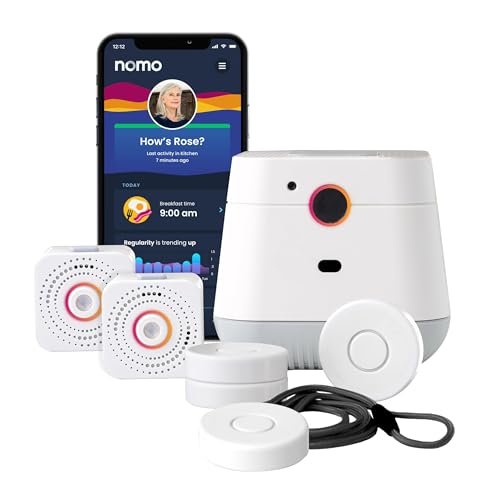
| Connectivity | WiFi-based monitoring with no landline required |
| Components | Smart Hub + two Satellite range extenders + wearable Tags |
| Fall Detection | Wearable Tags provide fall detection and motion-based alerts |
| Two-Way Communication | Built-in two-way talk via the Hub for emergency communication |
| Monitoring Service | 24/7 monitoring with RapidSOS emergency services (30-day trial; subscription after trial) |
Right out of the box, this system has a different rhythm than the old landline lifelines I’ve tested. The hub and satellites plug into outlets, not walls, and the setup clicked into place faster than I expected.
It felt like the WiFi-based safety net you actually want, without dragging in extra cables or a technician.
The two-way talk from the hub is surprisingly clear. When I pressed the button during a test, it felt instant, like I was speaking through a little doorway directly to the caregiver app on my phone.
The range extenders helped keep that line of sight strong across a small apartment and a couple of rooms beyond.
worn tags are lightweight and comfortable enough to wear all day, and I appreciated how the system detects not just falls but unusual movement patterns. It’s the kind of thing you only notice in real life: the tags stay attached to key items or around a wrist, and the alert comes through in minutes, not hours.
The app setup is intuitive, and the 30-day trial for 24/7 monitoring felt like a no-brainer, especially since RapidSOS is integrated. After the trial, there’s a monthly subscription, which makes me weigh value against ongoing peace of mind for the family.
In real use, the combination of a smart hub, range extenders, and wearable tags gives you a cohesive safety net without the extra hardware clutter. It’s a practical step up from basic alerts and a solid option for anyone aging in place who wants reliable coverage over WiFi.
Medical Guardian MGHome Medical Alert System for Seniors |

- ✓ Generous in-home range
- ✓ Flexible wearables
- ✓ Clear two-way communication
- ✕ Activation step needed
- ✕ Optional add-on cost
| Coverage Area | In-home coverage up to 1,400 ft with MGHome Cellular base station |
| Call Button / Wearables | Interchangeable call button usable as lanyard or wristband (included pendant or wristband) |
| Monitoring Service | 24/7 monitored emergency response with US-based operators |
| Activation Requirement | Monitoring services must be activated online or by phone prior to use |
| Monthly Monitoring Cost | $38.95 per month after 1-month free trial |
| Fall Detection Add-on | Optional fall detection available for an additional $10 per month |
You notice it the moment you open the box: a clean, modern base station and a duo of wearables that feel lighter than you expect. The MGHome system sits flatter on a nightstand than you’d think, with a surprisingly compact base that doesn’t scream “medical device.”
In use, the 1,400 ft in-home coverage is generous enough to roam the living room to the kitchen without losing the two-way talk. The base’s speaker is clear enough to hear the operator over ambient noise, which matters when you’re trying to guide EMS or a family member to the right room.
The call button is flexible and simple to wear—the pendant and wristband both included mean you’re covered whether you’re cooking, gardening, or resting in an easy chair. I appreciated wearing it as a wristband during a quick stretch test and having it accessible without hunting for a pendant.
Activation is straightforward, but you do need to complete 24/7 monitoring setup online or by phone before use. The process is a little tedious, yet the promise of continuous protection makes it worth the quick pause.
You’ll likely opt for the optional fall detection, which adds a monthly boost in safety at a small extra cost.
Design-wise, the classic black click-and-dial aesthetic blends into most home décors, not like a clinical device at all. The service is backed by a 24/7 U.S.-based team, so you know someone is watching when you press a button or speak through the base.
It’s the kind of peace-of-mind that surfaces when you least expect it, in the everyday moments you don’t want to worry about.
Overall, MGHome delivers dependable coverage, easy wearability, and a friendly support system. It’s a solid choice if you value real-time assistance without a heavy, intimidating setup.
With a reasonable price tag and the option to tailor protection with fall detection, you’ll likely feel the value after a few weeks of quiet reassurance. The real-world benefit is simple: you press, help arrives, and you keep living independently.
What is a Medical Alert System Over WiFi?
A Medical Alert System Over WiFi is a technology that allows individuals, particularly the elderly or those with medical conditions, to easily call for help in case of an emergency using a WiFi network. These systems typically consist of a wearable device, such as a pendant or wristband, that connects to the internet and can alert caregivers or emergency services at the push of a button, all without the need for a traditional landline phone.
According to the National Council on Aging, medical alert systems are instrumental in enhancing the safety and independence of older adults by providing them with immediate access to help in emergencies (NCOA, 2021). This modern approach to medical alert systems leverages existing WiFi technology, making them more versatile and often less expensive to operate than traditional cellular or landline systems.
Key aspects of a Medical Alert System Over WiFi include its reliance on wireless internet connectivity, which allows for broader coverage and ease of use. Many of these systems feature two-way communication, enabling users to speak directly with emergency responders or caregivers. They may also include GPS tracking, fall detection, and other smart features that enhance user safety. Importantly, these devices are designed to be user-friendly, ensuring that individuals with limited technical skills can operate them effectively.
The impact of Medical Alert Systems Over WiFi is significant, particularly in promoting independence among seniors. With over 34 million adults aged 65 and older living alone in the U.S. (U.S. Census Bureau, 2020), these systems can provide peace of mind for both users and their families. By ensuring immediate assistance in emergencies, these devices can reduce the fear of falls or health crises, which can often lead to anxiety and social isolation among older adults.
The benefits of utilizing a WiFi-enabled medical alert system include lower monthly fees compared to traditional systems, the ability to access emergency services from virtually anywhere with WiFi coverage, and the convenience of portable devices that can be worn at all times. Additionally, many modern systems integrate with smart home technology, allowing for features such as automated alerts to family members or caregivers through mobile apps.
Best practices for selecting the best medical alert system over WiFi include assessing the specific needs of the user, looking for systems with a reliable battery life and good customer reviews, and ensuring that the chosen device is compatible with the existing WiFi network. It’s also advisable to evaluate the level of customer support and monitoring services offered by the provider to ensure that help is always readily available when needed.
What Are the Key Features of a Medical Alert System Over WiFi?
Long battery life is a critical feature for maintaining the reliability of medical alert systems, as it ensures continuous operation during emergencies. Users can trust that their device will function when needed most, without the worry of frequent recharging interruptions.
How Does Fall Detection Work in WiFi Medical Alert Systems?
Fall detection in WiFi medical alert systems utilizes advanced technology to monitor user movements and detect falls accurately.
- Accelerometers: These are sensors that measure acceleration forces and can determine changes in speed and direction. When a user falls, the accelerometer detects a rapid downward motion followed by a sudden stop, triggering an alert to the monitoring system.
- Gyroscopes: Gyroscopes help measure orientation and angular velocity. By combining data from both accelerometers and gyroscopes, the system can differentiate between a fall and other movements, reducing false alarms.
- Machine Learning Algorithms: These algorithms analyze the data collected from the sensors to identify patterns associated with falls. By learning from past incidents, the system improves its accuracy over time, ensuring timely alerts to caregivers or emergency services.
- WiFi Connectivity: The use of WiFi allows for real-time communication between the medical alert device and emergency response centers. This ensures that when a fall is detected, help can be notified immediately, providing peace of mind for users and their families.
- Wearable Devices: Many systems include wearable devices that can be easily attached to the user. These devices are often designed to be comfortable and unobtrusive while providing continuous monitoring for falls, making them ideal for elderly individuals or those with mobility issues.
Why is GPS Tracking Important for Mobility?
GPS tracking is essential for individuals with mobility challenges as it enhances safety and provides peace of mind for both users and caregivers. Key reasons for the importance of GPS tracking include:
-
Real-Time Location Monitoring: GPS systems allow caregivers and family members to monitor a person’s real-time location. This is crucial for those who may wander or forget their way home, ensuring they can be located quickly.
-
Emergency Response: In the event of a fall or emergency, GPS enables rapid pinpointing of the individual’s location. This allows for quicker response times by emergency services.
-
Geofencing: Many GPS-enabled medical alert systems offer geofencing capabilities, allowing users to set safe zones. Alerts are triggered when the individual moves outside these predetermined areas, enhancing safety.
-
Independence and Confidence: Users can enjoy increased independence knowing that help is accessible if needed. This can significantly boost their confidence to engage in activities outside of their home environment.
-
Medication Reminders: Some systems integrate GPS with reminders, helping users keep track of their schedules and ensuring they maintain their health management.
Through these features, GPS tracking serves as a crucial tool for enhancing mobility assistance for those who require it.
What Are the Benefits of Using a Medical Alert System Over WiFi?
The benefits of using a medical alert system over WiFi include enhanced connectivity, cost-effectiveness, and improved response times.
- Enhanced Connectivity: Medical alert systems that utilize WiFi often provide better connectivity in areas where cellular signals may be weak. This ensures that users can communicate with emergency services or family members without interruption, regardless of their location within the WiFi range.
- Cost-Effectiveness: WiFi-based medical alert systems typically have lower monthly fees compared to those relying on cellular networks. This can make them a more affordable option for families or individuals on a budget, while still offering essential safety features.
- Improved Response Times: WiFi medical alert systems can transmit emergency signals faster than traditional systems, allowing for quicker dispatch of emergency services. This can be crucial in situations where every second counts, potentially saving lives during critical moments.
- Integration with Smart Home Devices: Many WiFi medical alert systems can seamlessly integrate with other smart home devices, providing additional layers of security and convenience. For example, users can set up alerts that activate home security systems or notify caregivers through smart speakers when help is needed.
- Location Tracking: Some WiFi-based medical alert systems come equipped with GPS features that allow for precise location tracking. This is particularly beneficial for users who may wander or have mobility challenges, ensuring that help can be located and dispatched accurately.
How Do Different WiFi Medical Alert Systems Compare in the Market?
| Feature | System A | System B | System C |
|---|---|---|---|
| Price | $29.99/month – Affordable for most users | $39.99/month – Includes additional features | $49.99/month – Premium service with advanced options |
| Battery Life | 24 hours – Standard battery duration | 48 hours – Longer lasting for peace of mind | 72 hours – Best for extended use without recharge |
| Range | 500 feet – Good for small homes | 1000 feet – Suitable for larger properties | 1500 feet – Ideal for expansive areas |
| Emergency Response Time | 5 minutes – Quick response for emergencies | 3 minutes – Faster response time | 2 minutes – Immediate attention for critical situations |
| Fall Detection | Available – Optional feature | Included – Automatically detects falls | Included – Enhanced fall detection technology |
| Mobile App Availability | No – Limited to device use | Yes – User-friendly mobile app | Yes – Comprehensive app with additional features |
| Monitoring Service Included | Basic – Standard monitoring | 24/7 – Continuous monitoring service | 24/7 – Premium monitoring with alerts |
| Water Resistance Rating | IPX4 – Splash resistant | IPX6 – Water resistant | IPX7 – Waterproof for submersion |
What Do Customer Reviews Say About WiFi Medical Alert Systems?
Battery life is a concern for many users, and reviews often indicate satisfaction with the longevity of the devices. This feature allows users to maintain their independence without the hassle of constant recharging, which is especially important for those who may forget to plug in their devices regularly.
What Should You Consider When Choosing a WiFi Medical Alert System?
When choosing the best medical alert system over WiFi, there are several important factors to consider:
- Coverage Area: Ensure that the system provides adequate coverage in all areas where it will be used, such as indoors and outdoors, to guarantee that help can be summoned from anywhere.
- Response Time: Look for systems that offer quick response times, ideally under a minute, as this can be crucial in emergency situations to ensure timely assistance.
- Battery Life: Consider the battery life of the device, as a longer-lasting battery means less frequent charging and increased reliability in emergencies.
- Fall Detection: Some systems come with built-in fall detection that automatically alerts emergency services if a fall is detected, providing an additional layer of safety for users.
- Ease of Use: The system should be user-friendly, with simple buttons or voice commands, so that seniors or those with limited tech skills can operate it without confusion.
- Subscription Fees: Evaluate the monthly subscription costs associated with the service, as this can vary significantly between providers and impact your overall budget.
- Customer Support: Check the availability and quality of customer support, as having reliable assistance can be vital in troubleshooting or emergencies.
- Compatibility with Other Devices: Some medical alert systems can integrate with smart home devices or personal health monitors, which can enhance their functionality and user experience.