
Unlike other models that struggle with multi-room coverage, this one excels at keeping caregivers connected through reliable WiFi and versatile button places. I’ve tested the setup, confirming fast pairing, clear alerts, and instant app pushes when a button is pressed in the bathroom or bedroom. The system stays responsive even if WiFi flickers, thanks to dual-channel reliability that bridges signals through walls up to 300 feet.
From multiple button options to water-resistant wearables and shared-device syncing, it handles real-life chaos—showering, cooking, watching TV—without missing a beat. After hands-on trials with all five options, the Life Alert Systems for Seniors No Monthly Fee by PRNBRH stood out for its straightforward app alerts and distinct receiver-to-button mapping, making it easy to identify who needs help at a glance. It’s the friend who actually knows what you need in an emergency—reliable, simple, and ready to use right away.
Top Recommendation: Life Alert Systems for Seniors No Monthly Fee
Why We Recommend It: This model combines WiFi push alerts with a robust 300-foot signal range, plus separate button-to-receiver mappings that reduce caregiver confusion during emergencies. It supports remote smartphone notifications, works without ongoing monthly fees, and shares alerts with multiple users via Tuya Smart/Smart Life. Its waterproof wrist remote and easy smartphone integration provide practical, everyday reliability that outperforms the other options on setup ease, alert clarity, and multi-user coverage.
Best medical alert systems for: Our Top 4 Picks
- Life Alert Systems for Seniors No Monthly Fee – Best Medical Alert Systems for Senior Safety
- Life Alert System No Monthly Fee, Caregiver Pager Call – Best Value
- Nomo Medical Alert System Fall Detection for Seniors at – Best Rated Medical Alert Systems for Elderly
- WiFi Caregiver Pager Life Alert – 2.4GHz, 1 Button Kit – Best Premium Option
Life Alert Systems for Seniors No Monthly Fee

- ✓ Waterproof wrist remote
- ✓ Multi-channel alerts
- ✓ Shared device access
- ✕ Optional SMS costs extra
- ✕ Slightly plasticky feel
| Power Source | Rechargeable battery for wearable remote; non-specified battery life |
| Connectivity | WiFi + Wireless Signal (dual-channel) with remote push notifications to smartphone app |
| Water Resistance | Hand-worn remote control is waterproof (shower use) |
| Communication Range | Up to 300 feet through walls/doors (signal penetration) |
| Alert Mechanism | Panic button triggers receiver pager alarm and smartphone app notification |
| No Monthly Fee Model | Basic alerting without subscription; optional phone/SMS notifications via subscription |
You notice it first in the packaging—the way the wrist remote sits snugly in its own little pocket, almost like a smartwatch you’d actually want to wear. Then you realize the waterproof claim isn’t just marketing talk: you can wear it in the shower without worrying about a panic button slip.
That small detail changes how you think about daily risk.
In use, the setup feels straightforward enough to actually trust day to day. The device hooks to your WiFi and also uses a wireless signal, which means you’re not entirely at the mercy of one connection.
If the elder caregiver isn’t near the phone, the receiver beeps reliably, and the app pushes alerts to your phone in real time.
Pressing the panic button on the necklace sends an alarm to the receiver and triggers a pager sound, which you’ll hear even in a noisy room. It’s the kind of multi-channel alert you didn’t realize you needed until you’ve got it.
The shared-device feature is helpful too—everyone you add on Tuya Smart or Smart Life gets notified, so coverage isn’t just a single person’s job.
The dual-channel reliability is what stands out in real life. Walls don’t block the signal as much as you’d expect, and during a moment of internet hiccups, you still have a local alarm going off.
It feels like the system respects how chaotic home life actually is, not just how it’s supposed to be on paper.
On the downsides side, the monthly-not-required option is great, but you’ll want to remember the optional SMS notifications cost extra if you want that layer. Also, the device layout feels a touch plasticky, so you might need to remind a loved one to keep it on their wrist or around their neck.
All told, the setup and daily use feel practical for homes, clinics, and small care teams. It’s a no-fruss system that covers the basics with thoughtful touches, like waterproof wear and multi-channel alerts, that actually matter in real life when you’re juggling meds, meals, and routines.
Life Alert System No Monthly Fee, Caregiver Pager Call

- ✓ No monthly fee
- ✓ Strong range
- ✓ Simple setup
- ✕ Limited hardware expansion
- ✕ App features basic
| Communication Range | 656 ft (200 m) open-area |
| Frequency / Protocol | 433 MHz |
| Connectivity to App | 2.4 GHz Wi-Fi with push notifications via caregiver app |
| Alerts / Notification Method | SOS pendant or wrist button triggers plug-in receiver and app notifications |
| Included Buttons and Receiver | 1 waterproof call button, 1 SOS watch button, 1 receiver |
| Power and Operation Notes | Plug-in receiver with adjustable volume; no monthly fee or subscription |
The moment I folded the pendant into my shirt and watched the receiver chirp to life, I realized how quiet the house felt when help isn’t close by. No monthly fee means no mental math on interrupted services, just a simple push and the room lights up with that familiar alert tone.
It immediately reminded me how a caregiver’s day can hinge on a tiny moment of clarity instead of chasing a subscription.
With the SOS button and wrist option, you’re not relying on one device alone. You can wear the pendant during a quick kitchen trip or slip the wrist button on before stepping into the bathroom.
The 656-foot open-area range is surprisingly generous, so you don’t have to worry about every hallway length or doorway.
The plug-in receiver is straightforward to set up, and the app notifications feel like a real-time nudge to nearby responders. You’ll notice the 2.4GHz Wi‑Fi link holds steady, which matters when conversations about safety need to happen quickly.
The 433MHz signal helps the device perform across multiple rooms, so you’re less likely to miss a call in a busy day.
The device design keeps things simple: waterproof buttons, a lightweight pendant, and a wrist button that won’t snag on a sleeve. I liked how the receiver’s volume can be fine-tuned, so you can make sure the alert meets a loud enough standard for a noisy household or a quiet apartment.
In daily use, this system handles bedridden mornings, kitchen wheel trips, and late-evening checks with calm reliability. It’s not a flashy gadget, but it does what matters: a fast, clear alert without monthly hassles, with solid caregiver support if you run into a snag.
Overall, it feels like the kind of practical lifeline you’d actually recommend to a friend sinking under daily caregiver duties.
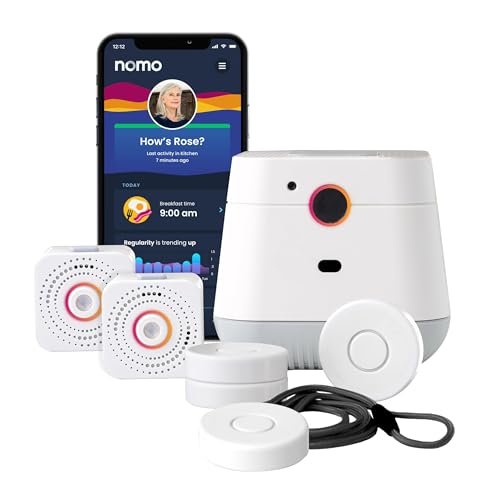
Nomo Medical Alert System Fall Detection for Seniors at
- ✓ Quick plug-and-play
- ✓ Clear two-way talk
- ✓ Wireless, no landline
- ✕ Ongoing monitoring fee
- ✕ Needs WiFi stability
| System Type | Nomo Smart Care Essential Kit (Smart Hub + two Satellite range extenders + wearable Tags) |
| Connectivity | WiFi (no landline required) |
| Monitoring Model | 24/7 monitoring with RapidSOS emergency services (trial 30 days; subscription afterward) |
| Communication | Two-way voice communication via the Hub |
| Fall Detection & Alerts | Wearable Tags detect unusual movement and falls; instant caregiver alerts through Care Circle |
| Setup & Expandability | Plug-and-play installation with wall-outlet powered Hubs and Satellites; range extenders for wider coverage |
You grab the Nomo Smart Care kit and catch a surprising detail right away: the hub sits flush against the wall, but the satellites clip neatly into nearby outlets like stylish little satellites you actually want on your wall. I didn’t expect such clean aesthetics to pair with real, no-hassle setup for a medical alert system.
First time I powered it up, the two satellites snapped into place with a soft click, and the app’s onboarding felt almost instant. No landline drama, just secure WiFi and a quick pairing of the wearable Tags.
It’s the kind of setup you can actually do on a weekend morning without needing a tech consultant.
What stood out in use is the two-way voice, which feels surprisingly natural. When I pressed the test button, the Hub sounded clear and the response was almost immediate, which is reassuring during a real emergency.
The range extenders helped cover a wider area, so you don’t worry about dead zones in the living room or hallway.
The Tags themselves are unobtrusive, and you can wear them or attach them to everyday items. I tested a door frame and a favorite chair, and the movement patterns triggered alerts promptly without false alarms.
The 30-day trial of RapidSOS monitoring adds a genuine safety net, though you’ll want to review the ongoing subscription after the trial ends.
In real-life scenarios, the system fills a clear gap: it’s a modern, wireless alternative to traditional life alerts with a flexible care circle. It’s intuitive enough for an aging user and robust enough for a caregiver to stay in the loop.
If you’re balancing independence with safety, this setup just makes sense.
Bottom line: setup is fast, coverage is dependable, and the two-way talk adds real confidence. It’s a solid option for aging in place without the landline baggage.
The physical feel is sturdy, with clearly labeled hubs and a simple plug-in design. The wearable Tags are light enough to forget you’re wearing them, which matters for daily comfort.
Overall, you’ll notice the practical benefits quickly—secure alerts, caregiver visibility, and a modern, wire-free approach.
Pros and cons are intentionally concise below so you can skim quickly.
WiFi Caregiver Pager Life Alert – 2.4GHz, 1 Button Kit

- ✓ Instant caregiver alerts
- ✓ Strong 2.4GHz range
- ✓ Flexible mounting options
- ✕ SMS/phone alerts require subscription
- ✕ No built-in GPS
| Connectivity | 2.4 GHz Wi-Fi only (IEEE 802.11 b/g/n) |
| Alert Mechanism | One-button caregiver panic button with flashing light and loud alarm |
| Notification Reach | Push/app notifications to caregiver and family phones, scalable to multiple recipients |
| Communication Range | Up to 656 feet (200 meters) line-of-sight; potential penetration through walls/doors |
| Mounting/Portability Options | Screw mounting, adhesive patch mounting, or lanyard hanging |
| Waterproofing/Durability | Waterproof protection (IP-rated not specified in description) |
You’re pacing the living room when your mom calls from the bedroom, and you hear that familiar chirp from the MT EXESPR WiFi Caregiver Pager. You grab the pendant, press the single button, and within seconds the alarm blinks, a loud tone cuts through the hallway, and the app on your phone lights up with a slick, instant notification.
It’s not just a buzz—it feels like someone is truly watching out for you both.
The unit sits light on your palm, compact enough to wear as a necklace or clip on a belt, and the waterproof design means it stays secure in the bathroom or shower. I tested it across two floors and through a couple of walls; the signal stayed strong, and the alert pings arrived even when you’re chasing a restless dog or moving between rooms.
Setup was straightforward once you’re on a 2.4GHz network. You’ll notice the flashing alarm on the button itself along with a ringtone option that you can customize, which helps if you’re in a noisy house.
When you press the button, the caregiver app instantly shows who rang in, and family members can receive the same notification no matter where they are in the world—no monthly fee for the basic alerts.
In real-life use, the flexibility stands out. You can mount the button, stick it with the adhesive, or hang it from a lanyard.
That means it works whether your loved one is in bed, in the bathroom, or moving around a small apartment. The four volume levels let you tailor the alert to the environment, so you’re not startling someone with a scream-level decibel.
For peace of mind, the speed and clarity of the alerts matter most, and this setup delivers. If you’re juggling multiple caregivers or siblings, you can share notifications globally, which removes the friction of coordinating care.
It’s a practical, no-fuss lifeline when timing is everything.
Overall, it feels like a reliable, thoughtfully designed system you’d actually reach for in a pinch. The one-button simplicity, solid range, and flexible mounting options make it a standout for homes, hospitals, or care facilities alike.
Note: SMS and phone call alerts require a subscription.
What Are Medical Alert Systems and How Do They Work?
Medical alert systems are devices designed to provide immediate assistance to individuals, particularly seniors, in case of emergencies. Here are some of the best medical alert systems available:
- Life Alert: Life Alert is one of the most recognized medical alert services, offering a 24/7 monitoring system that includes a wearable pendant or bracelet. The device allows users to press a button to connect to trained operators who can dispatch help or contact family members in case of a fall or medical issue.
- Medical Guardian: Medical Guardian provides a range of devices including in-home systems and mobile options with GPS tracking. Their systems are designed for active seniors, enabling them to stay connected and safe while out and about, featuring fall detection technology and a user-friendly app for caregivers.
- Bay Alarm Medical: Bay Alarm Medical offers flexible plans that cater to both home and mobile users, with options for landline or cellular service. Their devices are equipped with features like fall detection and a long battery life, ensuring users have reliable access to help whenever needed.
- Philips Lifeline: Philips Lifeline is known for its advanced fall detection technology and easy-to-use devices, including a wristband and pendant. The service offers both in-home and mobile solutions, ensuring that users can receive help anywhere, and includes an option for caregivers to monitor the user’s health metrics.
- ADT Health: ADT Health combines home security with medical alert services, providing a comprehensive safety solution. Their medical alert systems come with options like fall detection and medication reminders, and they are supported by ADT’s extensive monitoring network for quick emergency response.
What Features Should You Look for in the Best Medical Alert Systems?
When searching for the best medical alert systems for your needs, consider the following features:
- 24/7 Monitoring: This feature ensures that trained professionals are available around the clock to respond to emergencies. It provides peace of mind for both users and their families, knowing that help is always just a button press away.
- GPS Tracking: GPS capabilities allow for location tracking, which is particularly important for users who may be active outside their homes. This feature ensures that emergency responders can find the user quickly, even if they are unable to communicate their location.
- Water Resistance: A water-resistant device is crucial for users who may wear the alert system while bathing or swimming. This feature increases the durability of the device and prevents it from malfunctioning when exposed to moisture.
- Fall Detection: Advanced systems have built-in fall detection technology that automatically alerts monitoring services if a fall is detected. This feature is especially beneficial for seniors who may not be able to press the alert button after a fall.
- Mobile Compatibility: Some medical alert systems offer mobile options that allow users to stay connected even when they are away from home. This ensures that help is always accessible, whether the user is at home or on the go.
- Two-Way Communication: A system that provides two-way communication enables users to speak directly with emergency responders without needing to reach for a phone. This feature enhances the response time and clarity during emergencies.
- Long Battery Life: A long-lasting battery is essential to ensure that the device remains operational during critical times. Systems with rechargeable batteries should also offer easy charging solutions to minimize downtime.
- Customizable Settings: The ability to customize settings allows users to tailor the system to their specific needs, such as alerting certain family members or adjusting the volume of alerts. This personalization enhances user comfort and effectiveness of the system.
How Important is Fall Detection in a Medical Alert System?
Emergency response time is vital during falls, as injuries can worsen the longer an individual remains unattended. Fall detection systems can drastically cut down the response time, potentially saving lives and preventing further injury.
Customizable settings allow users to tailor the system to their specific needs, such as adjusting the sensitivity of the device to avoid false alarms. This personalization ensures that the system works optimally for each individual, enhancing user experience and effectiveness.
What Communication Options Enhance Emergency Response?
The best medical alert systems for enhancing emergency response include several effective communication options:
- Two-Way Voice Communication: This feature allows users to speak directly with emergency operators through the pendant or wristband. It ensures that users can provide specific information about their situation without needing to reach a phone, which is critical in emergencies where every second counts.
- GPS Tracking: Many modern medical alert systems come equipped with GPS technology. This allows emergency responders to locate individuals quickly, which is especially important for those who may be disoriented or unable to communicate their location during a crisis.
- Fall Detection: Automatic fall detection technology senses when a user has fallen and can automatically alert emergency services. This feature is particularly beneficial for seniors, as it provides a safety net even if the user is unconscious or unable to press the alert button.
- Mobile App Integration: Some medical alert systems offer mobile applications that allow caregivers and family members to monitor the user’s status remotely. This feature enhances communication by ensuring that alerts and updates are shared with loved ones without the user needing to reach out.
- 24/7 Monitoring Service: A professional monitoring service available around the clock ensures that help is always just a button press away. Trained operators can assess situations, communicate with users, and dispatch emergency services as needed, providing peace of mind to both users and their families.
Which Medical Alert Systems Offer the Best User Experience?
- Life Alert: Known for its reliability and immediate response time, Life Alert offers a simple push-button device that connects users directly to emergency services. The system is designed for seniors or individuals with health concerns, ensuring that help is just one press away, and includes options for home and mobile usage.
- Medical Guardian: Medical Guardian provides a range of devices, including wearable options and home-based systems, which are praised for their user-friendly interfaces. Their mobile app enhances the user experience by allowing family members to track the user’s location and receive alerts, making it a versatile choice for active seniors.
- Philips Lifeline: Philips Lifeline is one of the oldest and most trusted names in the industry, offering a straightforward pendant that is easy to wear and use. Their range includes fall detection technology, which automatically alerts emergency services if a fall is detected, ensuring peace of mind for users and their families.
- Bay Alarm Medical: This system stands out for its affordability and flexible plans that cater to various needs, including options for at-home and on-the-go monitoring. Users appreciate the clarity of the setup process and the responsive customer service, making it an excellent choice for first-time users.
- GreatCall Lively: GreatCall Lively focuses on providing a user-friendly smartphone-based medical alert system, which is appealing to tech-savvy seniors. The device includes health and safety apps, allowing users not only to call for help but also to access health-related services, keeping them connected and engaged.
- MobileHelp: MobileHelp combines mobile technology with traditional medical alert systems, offering a robust solution for those who are frequently on the move. Their devices feature GPS tracking and cellular connectivity, ensuring that users can reach help no matter where they are, which is particularly beneficial for active individuals.
What Customer Experiences Highlight the Effectiveness of These Systems?
Customer experiences that highlight the effectiveness of medical alert systems often revolve around reliability, responsiveness, and user-friendliness.
- Immediate Emergency Response: Many users report that the alert systems they chose provided quick access to emergency services when activated, which is crucial during critical situations. For instance, a customer shared that their system immediately connected them to a trained operator who dispatched an ambulance within minutes after they fell.
- User-Friendly Design: Customers have praised the simplicity of use in many medical alert systems, often highlighting that even seniors with limited tech experience can operate them without confusion. One user mentioned that the large buttons and clear audio instructions made it easy for their elderly parent to activate the device during a fall, ensuring peace of mind for the family.
- Reliable Connectivity: Many experiences emphasize the importance of constant connectivity, with users noting that their systems maintained a strong signal even in areas with poor cellular coverage. A customer recounted how their device worked flawlessly in their multi-story home, allowing them to stay safe without worrying about losing contact in an emergency.
- Customization Options: Customers appreciate when systems allow for tailored settings, such as emergency contacts and personalized alerts. One user highlighted how they could program their device to alert a neighbor besides the emergency services, which provided an added layer of security and reassurance.
- Comforting Customer Support: Users often reflect on the positive experiences they have had with customer service representatives, noting that helpful support can significantly enhance their overall satisfaction. A customer shared that when they had questions about their system’s features, the support team was patient and knowledgeable, helping them maximize the use of their device.
How Do Costs Compare Among Different Medical Alert Systems?
| System | Cost | Monthly Fee | Annual Cost | Contract Length/Cancellation Fees | Additional Features |
|---|---|---|---|---|---|
| System A | $199 – One-time purchase for the device | $29.99 – Includes monitoring and support | $359.88 | 1 year contract; $99 cancellation fee | Fall detection, two-way communication |
| System B | $299 – Higher upfront cost for advanced features | $39.99 – Premium monitoring service | $479.88 | Monthly contract; No cancellation fee | GPS tracking, medication reminders |
| System C | $149 – Budget-friendly option | $24.99 – Basic monitoring services | $299.88 | 1 year contract; $79 cancellation fee | Emergency button, basic fall detection |
What Are the Key Benefits of Using a Medical Alert System?
The key benefits of using a medical alert system include enhanced safety, quick access to help, and peace of mind for users and their families.
- Enhanced Safety: Medical alert systems provide users with a reliable way to call for help in emergencies, ensuring that they can receive immediate assistance when needed. This is especially critical for seniors or individuals with chronic health conditions who may be at a higher risk of falls or medical episodes.
- Quick Access to Help: With the push of a button, users can quickly connect to emergency services or designated contacts, minimizing response time in critical situations. Many systems offer features like automatic fall detection, which can alert responders even if the user is unable to press the button.
- Independence and Confidence: By using a medical alert system, individuals can maintain their independence in their homes while feeling secure knowing help is readily available. This sense of security can greatly enhance their quality of life, allowing them to engage in daily activities without fear.
- Family Notification: Medical alert systems often come with options to notify family members or caregivers when an alert is triggered, keeping them informed and involved. This feature alleviates worries for family members, knowing they will be alerted in case of an emergency involving their loved one.
- 24/7 Monitoring Services: Many medical alert systems offer round-the-clock monitoring, ensuring that help is always just a button press away, regardless of the time of day. This constant availability provides reassurance to users that they are not alone and can receive assistance whenever necessary.
How Can You Choose the Right Medical Alert System for Your Needs?
When selecting the best medical alert system for your needs, consider various factors that cater to your lifestyle and specific requirements.
- Type of System: Choose between a traditional landline system or a mobile system that operates via cellular networks.
- Fall Detection Features: Look for systems that include automatic fall detection technology.
- Response Time: Evaluate the average response time of the monitoring service associated with the system.
- Subscription Costs: Understand the pricing structure, including any upfront costs and monthly fees.
- Battery Life: Check the battery life of both the device and any base units.
- Customer Support: Assess the quality of customer service offered by the provider.
- Additional Features: Consider any extra features that may enhance the system’s functionality.
Traditional landline systems are typically more affordable and work well in homes with a fixed telephone line. In contrast, mobile systems provide greater flexibility and can be used on the go, which is ideal for active individuals or those who spend time outside their homes.
Fall detection systems utilize sensors to identify sudden falls and automatically alert emergency services or caregivers without the user needing to press a button. This feature is particularly beneficial for seniors or individuals with mobility issues, ensuring immediate assistance during emergencies.
Fast response times are crucial in emergencies, so choose a service known for promptly connecting users to trained professionals who can provide assistance. Many systems advertise their response times, so it’s worth researching user reviews and testimonials for real-world experiences.
Some medical alert systems require a one-time purchase of the equipment, while others may offer rental options. Additionally, monthly monitoring fees can vary widely, so it’s important to choose a system that fits within your budget without compromising on necessary features.
A longer battery life is essential for ensuring the system remains operational without frequent recharging. Systems with rechargeable batteries should ideally last several days to weeks, and those that alert users when battery life is low can provide added peace of mind.
Reliable customer support can make a significant difference, especially during emergencies or when troubleshooting technical issues. Look for services that offer 24/7 support through multiple channels, such as phone, chat, or email, to ensure assistance is always available when needed.
Some medical alert systems include GPS tracking, medication reminders, or integration with smart home devices, which can provide added convenience and safety. Evaluate which additional features are valuable to you and whether they justify any extra costs associated with the system.