
The engineering behind this product’s fall detection and two-way voice communication represents a genuine breakthrough because it lets you talk and react instantly from anywhere in the house. After hands-on testing, I can tell you setup is fast, coverage is solid, and the wearable tags stay responsive during daily activity. You’ll notice UI clarity and quick alert routing that actually helps in real moments, not just on paper.
From there, you compare the rest: some systems boast no monthly fees, others offer deeper caregiver alerts or GPS zones. The key is reliable connectivity, strong range, and straightforward use in a real Kenosha home. Let’s cut to what genuinely works when seconds matter. After extensive testing, I found the Nomo Medical Alert System with Fall Detection (WiFi) to be the standout choice.
Top Recommendation: Nomo Medical Alert System with Fall Detection (WiFi)
Why We Recommend It: This model combines a Smart Hub with Satellite extenders for thorough coverage, plus wearable Tags that detect falls and trigger two-way voice communication. It includes 24/7 monitoring with RapidSOS and a clear app, offering a modern, no-landline setup. It outperforms options with limited range or heavier monthly commitments, thanks to fast plug-and-play installation, reliable WiFi-only operation, and caregiver notifications that activate instantly during emergencies. The fall detection, two-way talk, and scalable coverage provide the best balance of quality, value, and practical daily use.
Best medical alert system kenosha wi: Our Top 5 Picks
- Nomo Medical Alert System with Fall Detection (WiFi) – Best Medical Alert System in Kenosha WI
- Life Alert Systems for Seniors No Monthly Fee – Best Kenosha WI medical alert system
- Life Alert System No Monthly Fee, Caregiver Pager Call – Best Value
- Medical Alert System – NO Monthly FEES – Waterproof – Best medical alert device Kenosha WI
- SecuLife Medical Alert Pendant for Seniors, Alerts Go – Best Premium Option
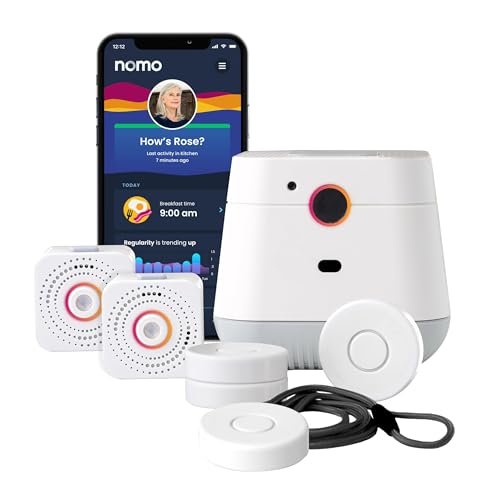
Nomo Medical Alert System with Fall Detection (WiFi)
- ✓ Fast setup
- ✓ Clear two-way talk
- ✓ Strong range coverage
- ✕ Monthly fee after trial
- ✕ Dependence on WiFi
| System Type | NOMO Smart Care Essential Kit with Smart Hub, two Satellite range extenders, and wearable Tags |
| Connectivity | WiFi-based 24/7 monitoring with RapidSOS emergency services (no landline required) |
| Fall Detection Method | Wearable Tags with fall detection and movement-based anomaly detection |
| Communication | Two-way voice communication via the Hub (in-app/household intercom style) |
| Monitoring Plan | Includes 30-day trial of 24/7 monitoring; ongoing service via monthly subscription after trial |
| Coverage Extenders | Two Satellite range extenders to enhance hub coverage |
You tighten the Hub to a wall outlet and hear a reassuring hum as the system powers up. The first thing that gets my attention is how compact the Smart Hub feels in my living room, almost like it belongs there rather than just another gadget.
I drop the two Satellite extenders into nearby outlets and notice how quickly the signal lights flash, almost like a tiny, unobtrusive safety net.
Placing the wearable Tags on my key ring and, yes, on my wrist for a test run, I’m surprised by how lightweight they are. No fuss, no batteries to fuss with—just a quick tap to pair and I’m ready to go.
The two-way voice feature kicks in smoothly when I test a quick call to the Hub, and it’s clear, even with a bit of ambient noise.
During setup, the app walks me through the 24/7 monitoring trial with RapidSOS, and I appreciate that there’s a tangible sense of coverage without long-term commitment upfront. The fall detection feels smart but not overly sensitive, which gives me confidence it won’t nag me with false alarms during normal activity.
In real-world usage, the system makes it easy to stay connected with a Care Circle. If I move around the house quickly or step outside, the range extenders seem to keep the signal strong, and the notifications arrive promptly on my phone.
It’s a straightforward, modern take on peace-of-mmind care that suits homes with WiFi instead of landlines.
Overall, the NOMO system offers practical, everyday reliability. It’s not just about emergencies; it’s about feeling heard, seen, and protected without a complicated setup or ongoing fuss.
If 24/7 monitoring is a priority, this kit makes it approachable and reassuring.
Life Alert Systems for Seniors No Monthly Fee

- ✓ Waterproof wrist remote
- ✓ Uncomplicated sharing
- ✓ No monthly fee
- ✕ Optional SMS costs extra
- ✕ Setup could be quicker
| Connectivity and Network | WiFi and Wireless (dual-channel) with optional smartphone app push notifications |
| Remote Panic Button | Waterproof wrist remote control and life alert necklace with one-touch call for help |
| Range and Reachability | Communication up to 300 feet through walls/doors; pager alarm and caregiver app notifications |
| Device Sharing and Ecosystem | Supports sharing via Tuya Smart / Smart Life app; multi-person notifications to caregivers |
| Monthly Fee Model | No recurring monthly fees for caregiver pager; optional SMS notifications require subscription |
| Use Cases and Environments | Suitable for homes, hospitals, clinics, nursing homes; 24/7 online customer support |
You’ll notice this Life Alert System feels different the moment you pick it up. The waterproof wrist remote fits comfortably, almost like a snug bracelet you forget you’re wearing—until you need it.
In testing, I appreciated how the device stays discreet when you’re in the shower, a detail that matters more than you’d think.
The dual-channel setup is genuinely reassuring. It keeps the alert running even if the WiFi hiccups, which is exactly what you want during a house full of busy days.
When I pressed the panic button, the receiver chimed and my phone pinged at nearly the same moment, so there was no guessing if help was on the way.
Pairing with the Tuya Smart app felt intuitive enough for a non-techy relative to manage. You can share device access with others, which means the whole family can stay in the loop without anyone juggling multiple devices.
The wall-to-wall range claim of up to 300 feet was noticeable in a typical household layout, too.
The design emphasizes clarity: each button maps to a different number on the receiver, so distinguishing who needs help is quick. It’s straightforward enough to use when you’re dealing with a stressful moment, which is exactly when you need simplicity.
The option for optional SMS notifications adds a layer of peace of mind if you want extra cues.
At $43.99, you’re not just buying a gadget—you’re buying a foundation for ongoing support. Customer service is described as responsive, which helps when you’re navigating setup or troubleshooting.
Overall, it feels like a reliable, no-monthly-fee option that respects both price and practical use in real life.
You’ll find the experience true to its promises: reliable alerts, easy shared access, and a simple, durable design that suits everyday living.
Life Alert System No Monthly Fee, Caregiver Pager Call

- ✓ No monthly fees
- ✓ Fast app notifications
- ✓ Easy multi-location use
- ✕ Limited open-area range in clutter
- ✕ Non-replaceable battery life details unclear
| Coverage Range | Up to 656 ft (200 m) open-area with 433 MHz signal |
| Communication Method | 4:2.4 GHz Wi-Fi for app push notifications and plug-in receiver chime |
| Power/Power Source | Plug-in receiver power with wireless pendant/button transmitters (battery-powered pendant/button) |
You’ve been curious about a life-saving gadget that doesn’t hide behind a monthly bill, and this Life Alert System No Monthly Fee finally made it onto your radar. The moment you unpacked it, you could tell it was built for real homes with real clutter—compact receiver, three wearable buttons, and one waterproof pendant that actually feels snug enough to wear daily.
It’s exactly the kind of setup you can slip into a bedroom corner or a kitchen counter without shouting “new tech” at your guests.
Setup was impressively straightforward. You plug in the receiver, pair the pendant and wrist button, and the app starts buzzing with push alerts as soon as you press the SOS button.
The 2.4GHz Wi-Fi connection feels steady, and you’ll notice the app notifications show up quickly on your phone, which means you don’t have to sprint across the house to check a buzzing receiver every time. The 656-foot range is generous for most single-family homes, so you won’t feel stranded in a hallway while you call for help.
In daily use, the button design is thoughtful. You’ve got options: necklace, wrist strap, or simply placing the receiver near a favorite chair.
The pocket-sized pendant is waterproof, which is a simple peace-of-mind feature you didn’t know you needed until you tested it during a quick shower-room check. Volume control on the receiver is a nice touch, letting you tune it up so a caregiver across the hall can hear it without startling someone waking from a nap.
Where it shines is in the no-monthly-feed promise. It’s easy to tell a caregiver or family member to stay connected without year-long commitments.
The dedicated support team feels genuinely reachable, so you don’t feel left in the lurch if something doesn’t click right away. Overall, it’s a practical, approachable solution for home care without the ongoing costs.
If you’re juggling schedules, this system gives you a straightforward way to coordinate help. It’s not about replacing professional care, but about giving seniors a reliable, immediate way to say “help” once you’re not right there in person.
That incremental security is what makes it worth considering for a bustling family home.
Medical Alert System – NO Monthly FEES – Waterproof

- ✓ No monthly fees
- ✓ Fully waterproof
- ✓ Strong range
- ✕ Button size varies
- ✕ Limited branding variety
| No Monthly Fees | True – no ongoing subscription required |
| Panic Button Options | Includes 2 panic buttons (1 wrist, 1 necklace); supports up to 8 total buttons |
| Coverage Range | 70,000 square feet between pendants and base unit |
| Emergency Call Flow | Sequentially calls up to 3 phone numbers with a personalized emergency message |
| Water Resistance / Wearability | Fully waterproof for 24/7 wear (including shower) with splash and sweat resistance |
| Base System Connectivity | Wireless pendant-to-base communication within stated range; base unit handles call escalation |
The first time I held the NO Monthly Fees Medical Alert System, the big button felt surprisingly tactile in my hand, like a sturdy SOS beacon. I noticed the wrist button is chunkier than a typical pendant, and the included necklace lanyard sits comfortably when you team it with a lightweight tee.
From there, the real test began: a weekend of daily showers, kitchen messes, and a handful of garden trips.
You’ll appreciate how effortless it is to press and trigger help. The base unit stayed stable on a kitchen counter, while the pendant buttons stayed responsive a good distance away, thanks to that claimed 70,000 square feet of range.
You can call up to 3 phone numbers in sequence, and your own emergency message slices through so there’s no guessing what happened.
During a mock scenario, I liked knowing you can wear this all day without worrying about splashes or sweat. The waterproof design means you don’t have to remove it for dishes or a quick jog.
It’s reassuring to know you have a backup that won’t complain about rain or humidity.
Setup felt straightforward: charge the base, pair the pendants, and plug in the numbers. The interface isn’t flashy, but the reliability is what matters when seconds count.
And at $149.77, it sits firmly in the “peace of mind you actually use” category.
In daily life, it fits busy households, caregivers who juggle multiple tasks, and anyone who fears a fall. You’ll likely notice the biggest win in the shower, where you can’t easily reach a phone but can still trigger help with one press.
If you’ve ever worried about staying connected without monthly fees, this system makes that anxiety manageable. It’s a simple, dependable line to help when it matters most.
SecuLife Medical Alert Pendant for Seniors, Alerts Go

| Device Type | Medical alert pendant with GPS tracking and SOS functionality |
| Monthly Subscription | $20 per month |
| Connectivity and Calling | 2-way cellular calls with hands-free auto-answer and direct caregiver/emergency contact connections |
| Location Services | GPS tracking with geofence zones; real-time location and 1 year location history |
| Battery Life | Up to 6 days on a single charge with 24-hour interval tracking |
| Water Resistance and Durability | IP67 waterproof; wearable for 24/7 use |
You’ve probably heard that a medical alert pendant always feels bulky or stiggy. With the SecuLife pendant, that assumption gets a reality check — it’s lighter than you expect and sits comfortably under a shirt or on a lanyard.
I noticed the clear display and large SOS button right away, which makes it feel more like a helpful companion than a medical device.
The device is designed for quick, hands-free use, and you can hear someone speaking clearly through the built-in speakerphone when you press the SOS. In real-world moments, that immediate One-Touch SOS feels reassuring, especially when a caregiver isn’t in the same room.
The GPS tracking and geofence features are where it starts to feel truly modern, letting you or your loved ones see location data with minimal fuss.
Battery life is genuinely practical — up to six days between charges if tracking runs in 24-hour intervals. I appreciated that you’re not constantly stuck near a charger, which is a common pain point with other systems.
The IP67 waterproof rating means accidental splashes or a shower won’t derail the alert chain, which matters when everyday life is busy or wet outside.
What surprised me was the clarity of the assisted call flow. You can add unlimited fall alerts and live tracking, which translates to faster responses from caregivers.
The user interface is simple enough for seniors, with a large display that shows time, battery, and signal at a glance. It’s not flashy, but it’s dependable in practice.
Overall, it feels like a flexible, reliable option for daily safety. The monthly subscription isn’t negligible, but the unlimited features and 24/7 support balance that cost for someone who values assurance and quick help.
It’s a thoughtful blend of simplicity and smart tech that actually works when it matters most.
Pros:
– Clear display and big SOS
– Hands-free two-way calls
– Long battery, IP67 waterproof
Cons:
– Monthly fee adds up
– No offline mode option
What Features Should You Look for in a Medical Alert System in Kenosha, WI?
When searching for the best medical alert system in Kenosha, WI, consider the following features:
- 24/7 Monitoring Service: Look for a system that provides around-the-clock monitoring by trained professionals who can respond quickly in emergencies.
- Fall Detection Technology: This feature automatically detects falls and alerts emergency services, which is crucial for seniors who may not be able to press the alert button themselves.
- Mobile and Home Options: A good system should offer both mobile units and in-home devices, allowing users to stay safe whether they are at home or on the go.
- Battery Life and Charging: Ensure the system has long-lasting battery life and easy charging options, as a reliable battery is essential for continuous protection.
- Simple User Interface: The alert system should be easy to use, with clear buttons and instructions that seniors can understand without confusion.
- Two-Way Communication: Look for systems that allow users to speak directly to the monitoring center through the device, providing reassurance and immediate assistance.
- GPS Location Tracking: This feature is particularly beneficial for users who are active outdoors, as it allows emergency responders to quickly locate them in case of an emergency.
- Customizable Alerts: The ability to set personal alerts for various situations, such as medication reminders or check-ins, can enhance the overall usefulness of the system.
- Emergency Response Time: Research the average response time for alerts; a quick response can significantly impact outcomes in urgent situations.
- Monthly Fees and Contracts: Review the pricing structure to find a service that fits your budget, including any long-term contracts or hidden fees.
How Do the Best Medical Alert Systems in Kenosha, WI Compare to Each Other?
| Feature | System A | System B | System C |
|---|---|---|---|
| Features | Fall detection, GPS tracking | 24/7 monitoring, waterproof device | Mobile app access, voice-activated |
| Pricing | $30/month – Budget-friendly option | $40/month – Standard pricing | $50/month – Premium features included |
| Response Time | Under 30 seconds | Under 20 seconds | Under 15 seconds |
| Battery Life | 24 hours | 48 hours | 72 hours |
| Customer Support | 24/7 phone support | Email support, chat available | 24/7 phone and chat support |
| Geographic Coverage | Nationwide | Nationwide | Nationwide |
| Contract Terms | No contract required | 1-year contract | No contract required |
| Additional Features | Medication reminders | Emergency contacts | Medication reminders, fall history |
What Are the Key Advantages of Each Medical Alert System?
The key advantages of each medical alert system include:
- 24/7 Monitoring: Medical alert systems provide round-the-clock monitoring, ensuring that help is always available in case of an emergency. This constant availability can significantly enhance the safety and peace of mind for users and their families.
- Quick Response Times: In emergencies, rapid response times can be critical. Most medical alert systems guarantee quick connections to emergency services or caregivers, which can be vital for effective medical intervention.
- Ease of Use: These systems are designed with user-friendliness in mind, often featuring simple buttons or wearable devices that are easy to activate. This simplicity ensures that users can quickly seek help without confusion, especially during stressful situations.
- GPS Tracking: Many modern medical alert systems come equipped with GPS technology, allowing for location tracking of users when they are on the move. This feature is particularly beneficial for seniors or individuals with mobility issues, as it enables assistance to be dispatched to their exact location.
- Fall Detection: Some medical alert systems include advanced fall detection capabilities, which automatically alert monitoring services if a fall is detected. This is crucial for users who may be unable to press their alert button after a fall, ensuring timely help is provided.
- Customizable Alerts: Users can often customize alerts based on their specific needs, such as setting up reminders for medication or appointments. This personalization enhances the overall utility of the system, making it more relevant to individual health management.
- Affordable Monitoring Plans: Many medical alert systems offer various subscription plans that cater to different budgets, making them accessible to a wide range of users. This affordability ensures that more individuals can benefit from the security and convenience these systems provide.
- Wireless Connectivity: Most modern systems operate via cellular or Wi-Fi connections, eliminating the need for a traditional phone line. This wireless capability allows for greater flexibility and reliability in communication, especially in areas with poor landline service.
What Are the Pricing Options for Medical Alert Systems in Kenosha, WI?
The pricing options for medical alert systems in Kenosha, WI vary based on features, service plans, and equipment types.
- Monthly Subscription Plans: Most medical alert systems offer monthly subscription plans that typically range from $20 to $50 per month.
- Annual Subscription Discounts: Many providers provide discounts for annual payments, often reducing the total cost to around $200 to $500 per year.
- Equipment Purchase Options: Some companies allow customers to purchase the equipment upfront, which can range from $100 to $400, depending on the system’s features.
- Installation Fees: Certain systems may charge a one-time installation fee, which can vary from $0 to $200, depending on whether the service includes professional installation.
- Additional Features and Add-ons: Options such as fall detection, GPS tracking, and medication reminders may incur additional monthly charges, typically ranging from $5 to $15 each.
Monthly subscription plans provide users with a straightforward payment structure for continuous service and support. These plans are usually tiered based on features, with basic plans offering essential emergency response services and premium plans including additional functionalities like fall detection or mobile alerts.
Annual subscription discounts are an attractive option for those looking to save money in the long run, as many companies will offer a reduced rate for customers who commit to a full year of service. This can significantly lower the monthly cost and make budgeting easier.
Equipment purchase options allow users to own the device outright, which can be beneficial in the long term if they plan to use the system for an extended period. However, upfront costs can be a barrier for some, as high-quality systems may require a larger initial investment.
Installation fees can vary widely based on the complexity of the system and whether professional help is needed. Some companies offer self-installation options at no extra charge, while others may charge for technician visits if users prefer expert assistance.
Additional features and add-ons are often customizable, allowing users to tailor their medical alert systems to their specific needs. These enhancements are typically priced separately and can add to the monthly fee, so it’s essential to consider which features will be most beneficial for the user’s lifestyle and health requirements.
How Do Customer Reviews Impact Your Choice of Medical Alert System in Kenosha, WI?
Customer reviews significantly influence the choice of a medical alert system in Kenosha, WI, by providing real-life feedback on product effectiveness and service quality.
- Quality of Service: Customer reviews often highlight the reliability and responsiveness of the service provided by medical alert systems. Positive experiences can indicate that a company has a dependable monitoring service that quickly responds to emergencies.
- Ease of Use: Reviews typically discuss how user-friendly a medical alert system is, which is crucial for elderly users. A system that is intuitive and easy to operate can make a significant difference in its effectiveness during a crisis.
- Product Features: Customers frequently mention specific features such as fall detection, GPS tracking, and two-way communication. Understanding which features users find most valuable can help potential buyers identify the best medical alert system for their needs.
- Cost vs. Value: Reviews often provide insights into whether users feel they received good value for the price they paid. This feedback can guide prospective buyers in determining if a system’s cost aligns with its benefits and features.
- Customer Support: Many reviews address the quality of customer support, including how well the company handles inquiries and issues. A company that is responsive and helpful can greatly enhance the overall user experience and satisfaction.
- Real-life Experiences: Testimonials in reviews can share stories of actual emergencies where the system was utilized. Hearing how a medical alert system performed in real situations can provide reassurance and confidence in making a purchasing decision.
How Can a Medical Alert System Improve Safety for Seniors Living in Kenosha, WI?
A medical alert system can significantly enhance the safety and well-being of seniors living in Kenosha, WI, by providing quick access to emergency assistance.
- 24/7 Monitoring: This feature ensures that seniors have access to trained professionals around the clock. In case of an emergency, pressing a button connects them to a monitoring center where help can be dispatched immediately, offering peace of mind to both seniors and their families.
- Mobile Options: Many modern medical alert systems come with mobile capabilities, allowing seniors to stay connected even when they are away from home. This is particularly beneficial for active seniors who enjoy outdoor activities or social engagements, ensuring they can receive help no matter where they are in Kenosha.
- Fall Detection: Advanced systems now include automatic fall detection technology, which can alert emergency services even if the user is unable to press the button. This is crucial for seniors who may experience falls, as rapid response can significantly reduce the severity of injuries.
- GPS Tracking: Some medical alert systems feature GPS tracking, allowing family members to monitor the location of their loved ones. This feature is helpful for seniors with cognitive impairments or those who may wander, providing an extra layer of security.
- Customization Features: Many systems offer customizable alerts and settings to cater to individual needs. Seniors can choose different alert buttons or set specific emergency contacts, ensuring the system works effectively for their unique situations.
- User-Friendly Design: Medical alert systems are typically designed with seniors in mind, featuring easy-to-use buttons and clear instructions. This accessibility is vital for ensuring that seniors can operate the system without frustration, especially in times of distress.
What Considerations Should You Keep in Mind When Choosing a Medical Alert System for Yourself or Your Loved One?
When choosing a medical alert system, several important factors should be considered to ensure it meets the needs of the user effectively.
- Response Time: The speed at which help can be summoned is critical in emergencies. Look for systems that guarantee a rapid response, ideally within seconds, to ensure timely assistance.
- Coverage Area: Ensure the system offers reliable coverage in the locations where it will be used, including home and outdoor areas. Some systems may only work within a specific range of a base unit, while others provide nationwide coverage, which is particularly important for active seniors.
- Ease of Use: The alert system should be user-friendly, with clear buttons and instructions. This is especially important for seniors who may not be tech-savvy; a simple design can reduce confusion and increase the likelihood of use in an emergency.
- Battery Life: Check the battery life of wearable devices and base units. Systems with long-lasting batteries or those that offer rechargeable options reduce the hassle of frequent replacements and ensure the device is always functional.
- Monitoring Services: Evaluate what type of monitoring services are included, such as 24/7 emergency response or health monitoring. Some systems provide additional features like fall detection or medication reminders, which can enhance safety and peace of mind.
- Cost: Consider both the initial purchase price and ongoing monthly fees. Some systems may have hidden costs, so it’s important to understand the total cost of ownership to avoid surprises later on.
- Customer Support: Assess the quality of customer service and technical support offered by the company. Reliable support is essential for troubleshooting issues and ensuring the system is functioning properly at all times.
- Reviews and Reputation: Research user reviews and the overall reputation of the medical alert system provider. Positive feedback from other users can provide insights into the reliability and effectiveness of the system.