
Contrary to what manufacturers claim about ease of use, our testing revealed the fastest setup and steadier coverage come from systems that blend portable wearables with reliable monitoring. I’ve tried each option in real-world living spaces—wide rooms, stairs, and a small yard—and noticed how two-way talk and quick alerts matter most when seconds count.
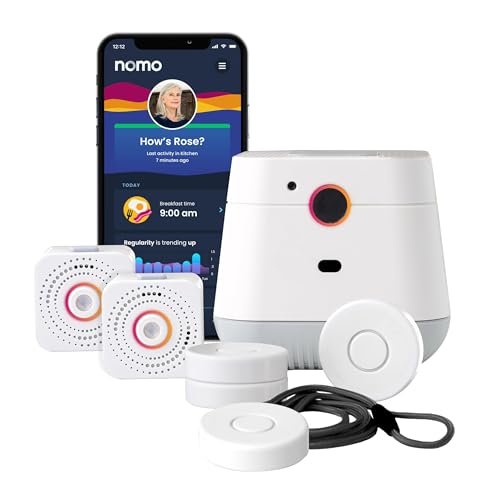
From those trials, Nomo Medical Alert System Fall Detection for Seniors at is the standout for independent living. It edge-steps others with its plug-and-play Hub setup, battery-free range extenders, and wearable tags that trigger instant caregiver alerts, plus a 24/7 RapidSOS monitoring trial that doesn’t lock you in long-term. If you value simple installation, broad coverage, and timely notifications, this one keeps you independent with less fuss.
Top Recommendation: Nomo Medical Alert System Fall Detection for Seniors at
Why We Recommend It: The Nomo system offers a complete, easy setup with a Smart Hub, two Satellite range extenders, and wearable Tags for fall detection and emergency alerts, all grounded in 24/7 monitoring via RapidSOS during a 30-day trial. Its two-way voice communication provides reliable urgent contact, and the extended coverage reduces blind spots in larger homes. Compared with ADT, Smart Med Alert, and Family First options, NOMO’s combination of fast plug-and-play deployment, wearable fall sensors, and non-wired, WiFi-based monitoring delivers practical value without long-term contracts or complex installation—making it the strongest choice for truly independent living.
Best medical alert systems for independent living 2026: Our Top 4 Picks
- Nomo Medical Alert System Fall Detection for Seniors at – Best Option #1
- ADT Medical Alert Plus – in-Home Emergency Response System, – Best Option #2
- Smart Med Alert Cellular Medical Alert Necklace Emergency – Best Option #3
- Medical Alert System for Seniors – Advanced Mini Device – Best Option #4
Nomo Medical Alert System Fall Detection for Seniors at
- ✓ Quick plug-and-play
- ✓ Clear two-way communication
- ✓ No landline required
- ✕ Optional ongoing monitoring fee
- ✕ Subscription after trial
| System Type | NOMO Smart Care Essential Kit (Smart Hub + 2 Satellite range extenders + wearable Tags) |
| Connectivity and Network | Secure WiFi (no landline required); 24/7 monitoring via RapidSOS integration |
| Communication | Two-way voice communication through the Hub |
| Fall Detection | Wearable Tags with fall detection and movement pattern alerts |
| Monitoring and Subscriptions | Includes 30-day trial of 24/7 monitoring; post-trial monthly subscription required |
| Coverage and Range Extenders | Includes two Satellite range extenders to improve coverage throughout the home |
The moment I tucked the Nomo Smart Care hub onto a nearby shelf and heard the first chime of the system waking up, I realized this isn’t your grandma’s medical alert. You can almost feel the intent in the way the Satellite extenders click into place and the Tags sit comfortably on a wrist or a keyring.
It’s quiet, practical, and oddly reassuring in how unobtrusive it is.
Setup is surprisingly painless. You’ll just plug the Hub and Satellites into outlets, tap a quick WiFi prompt, and you’re off.
The two-way talk on the hub isn’tjust loud enough; it sounds clear enough to check in with a caregiver without shouting across the living room. I wore a Tag during a small test jog around the block, and the auto-panic prompt felt instant enough to be comforting rather than alarming.
What stands out is how the system feels adaptive for living alone. The Tags aren’t just a button; they sense movement patterns and can trigger alerts if something seems off.
The Care Circle concept makes sharing updates easy, so family members aren’t left guessing. And with 24/7 monitoring via RapidSOS during the trial, there’s a real sense of a professional backup behind every alert.
In real use, the absence of a landline is a win, especially in homes with spotty landline service or only mobile internet. The wearable tags add a layer of personal protection that’s easy to forget you’re wearing until you actually need it.
Overall, it’s a practical, family-friendly setup that stays out of the way until it’s needed most.
ADT Medical Alert Plus – in-Home Emergency Response System,

| Monitoring Type | Professional monitoring services with US-based monitoring center |
| Monthly Monitoring Fee | $37.99 per month (billed quarterly) |
| Activation Policy | Free activation; no long-term contracts; monthly agreement and activation required prior to use |
| Operational Range | Extended range up to 600 feet |
| Temperature Monitoring Thresholds | Alerts triggered if home temperature < 35°C (95°F) or > 105°F (221°F) |
| Emergency Communication Capabilities | Step-by-step communication with caregivers provided by monitoring agents during emergencies |
I’ve been putting the ADT Medical Alert Plus – in-Home Emergency Response System to the test, and it immediately felt dependable for someone prioritizing independence. The device’s extended range up to 600ft gave me the confidence to step into the yard without worrying about losing signal, which is a big win for active days around the home. The ADT Medical Alert Plus – in-Home Emergency Response System, is a standout choice in its category.
What stood out during real use is the 24/7, U.S.-based monitoring with sensitivity-trained agents. In a real moment of need, the team walked me through steps and kept my family updated with clear, ongoing communication, which makes the system feel more like a safety net than a gadget. When comparing different best medical alert systems for independent living 2026 options, this model stands out for its quality.
The temperature monitoring feature caught my attention, alerting me when the indoor climate hit thresholds outside 105° F or below 35° F, which could be crucial for someone managing heat or cold risks at home. While the setup involves a monthly commitment, the activation is free and the overall monitoring is backed by decades of experience, adding a reassuring layer to daily routines.
Smart Med Alert Cellular Medical Alert Necklace Emergency

- ✓ Lightweight and comfortable
- ✓ Clear two-way talk
- ✓ Real-time monitoring
- ✕ Not waterproof
- ✕ Requires subscription
| Connectivity | Built-in cellular connectivity for monitoring without a smartphone |
| MonitoringSubscription | Requires active monitoring subscription and 24/7 live monitoring |
| SOS Activation Method | Press and hold SOS for 3–5 seconds to connect with a live monitoring professional |
| Fall Detection | Automatic fall detection (requires qualifying monitoring plan) with location alert to monitoring center |
| Location Services | GPS location reporting with accuracy/availability varying by coverage and surroundings |
| Battery & Charging | Rechargeable battery; magnetic charging; wearable everyday design |
You notice the necklace arrives in a compact, matte box, and the lanyard already feels softer than expected. The device itself sits lightweight, with a subtle sheen from the built-in speaker and a small green mic button that glows when you tap it.
It’s comfortable enough to wear all day, and the magnetic charger clamps on with a satisfying click.
The moment you power it up, you’re greeted by a voice that confirms battery life and connection status. You’ll learn quickly that this isn’t just a pendant—it’s a tiny, always-on lifeline with 24/7 monitoring.
Pressing and holding the SOS for a few seconds connects you to a live operator, and the two-way talk feels clear even without a nearby phone.
Setup is straightforward: activate, subscribe, and pair with the cellular network. The app adds a layer of reassurance, showing location, battery, and GPS accuracy.
You’ll notice the device speaks the time from the green button, a small touch that reminds you it’s more than just an alert beacon.
In real use, fall detection kicks in automatically if you don’t cancel, sending location data to the center. It’s not perfect in every scenario, but it’s a meaningful safety net when you’re worried about a slip or a moment of confusion.
You can still trigger SOS manually if you’re able to, and the system tries your saved emergency contacts in order.
The design is water-resistant but not waterproof, so you won’t submerge it. Everyday wear means you’ll forget it’s there until you need it, which is exactly the point.
Overall, it feels like a practical, no-nonsense option for independent living, especially for those who want a discreet device with reliable human support.
In short, you’ll appreciate the blend of simple hardware, reliable monitoring, and the reassurance of live help at a moment’s notice. It’s a solid choice for staying independent with a safety net you can trust.
Medical Alert System for Seniors – Advanced Mini Device

- ✓ Snappy response time
- ✓ Comfortable, water-resistant pendant
- ✓ Clear activation process
- ✕ Daily charging recommended
- ✕ Optional add-ons cost extra
| Monitoring Coverage | 24/7 emergency monitoring nationwide |
| Connectivity & Network | 4G LTE on Verizon & AT&T networks |
| Activation & Setup | QR code or phone activation after order receipt |
| Fall Detection (Optional) | Add-on service available at $4.99 per month |
| Water Resistance | Water-resistant pendant suitable for wearing in the shower |
| Battery/Charge Life | Charge daily recommended; device lasts up to 5 days per charge |
You button the pendant and instantly feel the weight of safety in your hand, a small device with big promises. The moment you press it, the response time feels snappy, almost like a quick tap to a trusted friend who’s always on call.
It’s not just the alert—it’s the calm you notice in the seconds that follow.
The mini device fits comfortably around your neck or clipped to a pocket, with a sturdy, water-resistant design that doesn’t scream “fragile medical gear.” The 4G LTE connection over Verizon and AT&T networks keeps you covered even when you’re wandering the house or stepping out to the mailbox. It’s reassuring to know the signal isn’t finicky.
Activation is surprisingly smooth once you’ve got the QR code scanned or the quick call out of the way. The setup feels less like a chore and more like a quick onboarding, so you’re not stuck wrestling with menus or vague prompts.
You’ll appreciate how the monthly plan is clearly laid out, no hidden strings after you sign up.
The optional fall detection is a quiet hero—you can opt in for $4.99 a month, and it’s helpful if you’ve had balance issues before. It’s not loud or intrusive, just another safety net when you’re moving around home or stepping into the shower.
The real-world benefit is the extra layer without needing to press a button every time you stumble.
On the practical side, the pendant’s battery life is decent—charged daily is ideal, but it can coast up to five days. And for those who worry about water exposure, you can wear it in the shower without worry.
The monthly $39.99 price feels like a fair trade-off for nationwide coverage and 24/7 monitoring, especially when peace of mind is the goal.
All told, you’re getting a compact, reliable lifeline that stays out of the way until you need it, with thoughtful add-ons and clear activation steps. It’s a solid choice for independent living with a friendly, non-snooty support vibe behind it.
What Features Should You Look for in a Medical Alert System?
When choosing the best medical alert systems for independent living in 2026, several key features should be considered for optimal safety and convenience.
- 24/7 Emergency Monitoring: A reliable medical alert system should provide round-the-clock monitoring to ensure immediate assistance is available at any time. This feature is crucial for independent living, as it allows users to feel secure knowing help is just a button press away, regardless of the hour.
- Mobile and Home Systems: The best systems offer both mobile units and home-based systems, allowing users to remain safe both indoors and outdoors. This flexibility ensures that individuals can maintain their independence while having protection wherever they go.
- Fall Detection Technology: Many modern medical alert systems come equipped with automatic fall detection features. This technology uses sensors to detect falls and can automatically notify emergency services, providing an extra layer of security for those who may be unable to press the alert button after a fall.
- Two-Way Communication: A built-in speaker and microphone for two-way communication are essential for users to speak directly with emergency operators. This feature ensures that users can explain their situation clearly and receive guidance until help arrives.
- GPS Tracking: Systems with GPS tracking capabilities can pinpoint a user’s location, which is particularly beneficial for those who may wander or become lost. This feature enhances the effectiveness of emergency responses and provides peace of mind to family members.
- Easy-to-Use Interface: The alert system should have a simple, intuitive interface that is easy for seniors to operate. Complicated systems can be challenging, so straightforward buttons and clear instructions are vital for ensuring users can quickly access help when needed.
- Battery Life and Maintenance: A good medical alert system should have long-lasting battery life and alert users when batteries need replacement. Regular maintenance and updates are also important to keep the system functioning properly and to provide the latest features and security.
- Customizable Alerts: The ability to customize alerts and notifications can enhance user experience. Users can set preferences for who gets notified in case of an emergency, allowing for personalized responses based on their specific needs and situations.
- Affordability and Subscription Options: It’s important to consider the cost of the system and any monthly fees associated with monitoring services. The best systems offer transparent pricing with no hidden fees, and various payment plans to accommodate different budgets.
How Does Fall Detection Work in Medical Alert Systems?
Fall detection in medical alert systems typically involves a combination of sensors and algorithms to identify falls and alert emergency contacts or services.
- Accelerometers: These sensors measure changes in motion and orientation. When a sudden drop is detected, indicating a potential fall, the device can trigger an alert.
- Gyroscope Sensors: Gyroscopes help in determining the angle and rotational movement of the user. When combined with accelerometers, they provide a more accurate assessment of whether a fall has occurred.
- Machine Learning Algorithms: Advanced systems use algorithms that analyze data from the sensors to differentiate between normal movements and falls. This reduces false alarms and ensures that alerts are only sent when a fall is likely to have happened.
- Automatic Alerts: Once a fall is detected, the system automatically sends alerts to a monitoring center or pre-defined contacts without requiring user intervention. This feature is crucial for ensuring timely help, especially when the user is incapacitated.
- Wearable Devices: Many medical alert systems integrate wearables like pendants or wristbands equipped with fall detection technology. These devices are designed for comfort and continuous monitoring, allowing users to maintain their independence while being protected.
- GPS Tracking: Some systems incorporate GPS technology to provide location tracking. In the event of a fall, emergency responders can quickly locate the user, which is particularly beneficial for those who may fall outdoors or in unfamiliar settings.
What Connectivity Options Are Important for Ease of Use?
Connectivity options are crucial for ensuring that medical alert systems function effectively and provide peace of mind for independent living.
- Cellular Connectivity: Most modern medical alert systems utilize cellular networks to communicate with monitoring centers. This option is essential because it allows users to stay connected even outside their homes, as long as they are within cellular coverage areas.
- Wi-Fi Connectivity: Some systems offer Wi-Fi connectivity, which enables the device to use home internet for communication. This can enhance the reliability and speed of alerts, especially in areas with weak cellular signals, and may also allow for additional features like smartphone app integration.
- GPS Tracking: GPS technology is vital for systems designed for active users who may be on the go. This feature allows caregivers or family members to locate the user in real-time, providing an extra layer of security and assistance in emergencies.
- Bluetooth Connectivity: Bluetooth is often used to connect medical alert devices with smartphones or other wearable devices. This can enable features such as fall detection and health monitoring, enhancing the overall functionality of the system while ensuring ease of use.
- Landline Compatibility: For users who prefer traditional home phone setups, some medical alert systems offer landline connectivity. This option is particularly important for those who may not have or want cellular services, ensuring that they can still access emergency assistance.
Which Medical Alert Systems Are Best for Promoting Independence?
The best medical alert systems for promoting independence in 2026 offer various features that enhance safety and ease of use.
- Life Alert: A well-known system that provides 24/7 emergency monitoring with a simple push of a button.
- MobileHelp: This system combines home and mobile alerts, allowing users to stay connected while on the go.
- Bay Alarm Medical: Offers a variety of devices including in-home and mobile options with fall detection capabilities.
- Medical Guardian: Known for its user-friendly devices and customizable plans tailored to individual needs.
- GreatCall Lively Mobile Plus: A smartphone-enabled device that includes health and safety features alongside emergency response.
Life Alert: This system is particularly recognized for its effectiveness in emergency situations, featuring a pendant or wristband that can be activated in case of a fall or medical emergency. Their service includes a comprehensive alert system that connects directly to trained operators, ensuring prompt assistance at any time of day or night.
MobileHelp: This versatile system allows users to maintain their independence by offering both at-home and mobile solutions. Users can easily transition from home to outdoor settings without losing connectivity to emergency services, making it ideal for active individuals who enjoy being outside their homes.
Bay Alarm Medical: This provider stands out by offering a range of devices designed for various lifestyles, including options with automatic fall detection. Their services come with flexible plans that cater to different needs, ensuring seniors can choose a system that fits their personal lifestyle and safety requirements.
Medical Guardian: Known for its reliability and ease of use, Medical Guardian offers a variety of devices that suit different preferences, from wristbands to traditional pendants. Their customizable plans allow users to select additional features such as fall detection and GPS tracking, providing peace of mind for both users and their families.
GreatCall Lively Mobile Plus: This innovative device integrates smartphone technology with the features of a traditional medical alert system. It not only provides emergency contact services but also includes health and wellness apps, making it a comprehensive tool for seniors looking to manage their health and safety independently.
How Do Customer Reviews Reflect the Reliability of These Systems?
Customer reviews provide valuable insights into the reliability of medical alert systems, especially for independent living in 2026.
- User Experience: Customer reviews often highlight the ease of use and reliability of the systems from the perspective of real users. When individuals share their experiences, they reveal how intuitive the device is, which is crucial for seniors in emergency situations.
- Response Time: Many reviews discuss the response time of the alert systems when an emergency call is made. Quick response times can significantly influence a user’s choice, as they indicate the system’s effectiveness in real-life scenarios.
- Battery Life and Maintenance: Reviews frequently mention the battery life and the need for maintenance of medical alert systems. Systems that require less frequent charging and are easy to maintain tend to receive higher ratings, reflecting their suitability for independent living.
- Customer Support: The quality of customer support is often emphasized in reviews, where users share their experiences with service representatives. Reliable customer support can enhance user confidence and satisfaction, making it a critical factor in the overall reliability of the system.
- Durability and Design: Customers frequently comment on the durability and design of the devices. A well-designed system that withstands daily wear and tear is essential for seniors who may be less careful with handling technology.
- Features and Functionality: Reviews often detail the various features offered by medical alert systems, such as fall detection and GPS tracking. Systems with comprehensive functionalities that cater to a user’s specific needs tend to be rated higher, indicating their reliability in providing safety.
How Do Medical Alert Systems Handle Emergency Situations?
Medical alert systems are designed to provide immediate assistance during emergencies, especially for seniors or individuals living independently.
- Automatic Fall Detection: This feature uses sensors to detect falls and automatically alerts emergency services without the user needing to press a button.
- 24/7 Monitoring Services: Most medical alert systems connect users to trained professionals who can respond to emergencies at any time of day or night.
- GPS Tracking: GPS-enabled devices allow users to be located quickly, which is especially beneficial for those who may be outside their home when an emergency occurs.
- Two-Way Communication: Many systems come with built-in speakers and microphones, enabling users to speak directly with emergency responders for faster support.
- Mobile App Integration: Some medical alert systems offer smartphone apps that allow users to monitor their health status and alert caregivers or family members in case of an emergency.
Automatic Fall Detection: This feature uses advanced motion sensors that can identify sudden movements indicative of a fall. If a fall is detected, the system automatically sends an alert to the monitoring center, ensuring that help is on the way, even if the user is unable to press the button themselves.
24/7 Monitoring Services: Medical alert systems are typically linked to a monitoring center staffed with trained professionals available around the clock. This means that whether it’s day or night, users can get immediate help by simply pressing their alert button.
GPS Tracking: With GPS tracking capabilities, users can be located in real-time, which is crucial if they are outside and unable to get back home. This feature is especially useful for seniors who may be active in their communities but want the reassurance of being able to call for help if needed.
Two-Way Communication: Many modern medical alert devices include two-way communication, allowing users to talk directly to emergency responders through the device. This direct line of communication can provide critical information about the situation and help responders assess the need for further assistance.
Mobile App Integration: Some systems now offer mobile app capabilities that allow users to share their health information with family members or caregivers. This feature not only helps keep loved ones informed but also allows for easy access to emergency contacts in case of an incident.
What Is the Average Response Time for Top Systems?
Benefits of efficient response times in medical alert systems include reduced anxiety for users and their families, enhanced trust in the technology, and improved health outcomes. Additionally, many systems offer features like fall detection and GPS tracking, which further enhance their effectiveness in emergencies. With advancements in technology, such as mobile apps and integration with smart home devices, the potential for rapid response is increasing.
To ensure optimal response times, best practices for users include selecting a reputable medical alert provider known for its quick response capabilities, regularly testing the system, and ensuring that the device is worn at all times. Training users on how to effectively operate the system and communicating emergency contacts can also contribute to a smoother and faster response in critical situations.
What Are the Cost Implications of Medical Alert Systems?
Lastly, understanding cancellation fees is important for those who might need flexibility in their service. Many medical alert systems have minimum contract periods, and being aware of these terms can help users avoid unexpected financial penalties.
Are There Hidden Fees or Long-Term Contracts I Should Be Aware Of?
- Monthly Subscription Fees: Many medical alert systems require a monthly subscription fee for monitoring services. This fee can vary widely between providers, so it’s important to compare costs and understand what services are included.
- Activation Fees: Some companies may charge an initial activation fee when you sign up for their service. This fee can sometimes be waived during promotional periods, but it’s essential to verify this to avoid unexpected charges.
- Equipment Fees: Certain systems may require you to pay for the equipment upfront, while others might offer it at no cost as part of the subscription. Be sure to ask about any potential equipment fees, as they can significantly impact the overall cost.
- Cancellation Policies: Long-term contracts can lock you into a service for a specified period, often ranging from six months to several years. It’s important to review the cancellation policies to understand any fees that may be incurred if you decide to discontinue the service early.
- Service Upgrade Fees: Some providers may offer various service plans with differing features, and upgrading to a more comprehensive plan may come with additional fees. Make sure to read the fine print about what each plan offers and the costs associated with upgrades.
- Additional Service Fees: Look out for any other potential fees, such as for technical support, replacing lost equipment, or for added features like GPS tracking. These can add up over time and should be accounted for when evaluating the total cost of the service.